> ## Documentation Index
> Fetch the complete documentation index at: https://wb-21fd5541-serverless-sft-revamp.mintlify.site/llms.txt
> Use this file to discover all available pages before exploring further.
# Artifacts の概要
> W&B Artifacts の概要、その仕組み、および使用の 開始方法 について説明します。
export const TryProductLink = ({url}) =>
Try in W&B
;
export const ColabLink = ({url}) =>
Try in Colab
;
W\&B Artifacts を使用して、 [W\&B Runs](/models/runs/) の入力および出力となるデータの追跡とバージョン管理を行います。例えば、モデルトレーニングの run では、データセットを入力として受け取り、トレーニング済みモデルを出力として生成します。ハイパーパラメーター、メタデータ、メトリクスを run にログ記録できるほか、 Artifacts を使用して、モデルのトレーニングに使用したデータセットを入力としてログ、追跡、バージョン管理し、別の Artifacts を出力としてのモデルチェックポイントに使用できます。
## ユースケース
ML ワークフロー全体を通して、 [runs](/models/runs/) の入力および出力として Artifacts を使用できます。データセット、モデル、あるいは他の Artifacts をプロセッシングの入力として使用することが可能です。
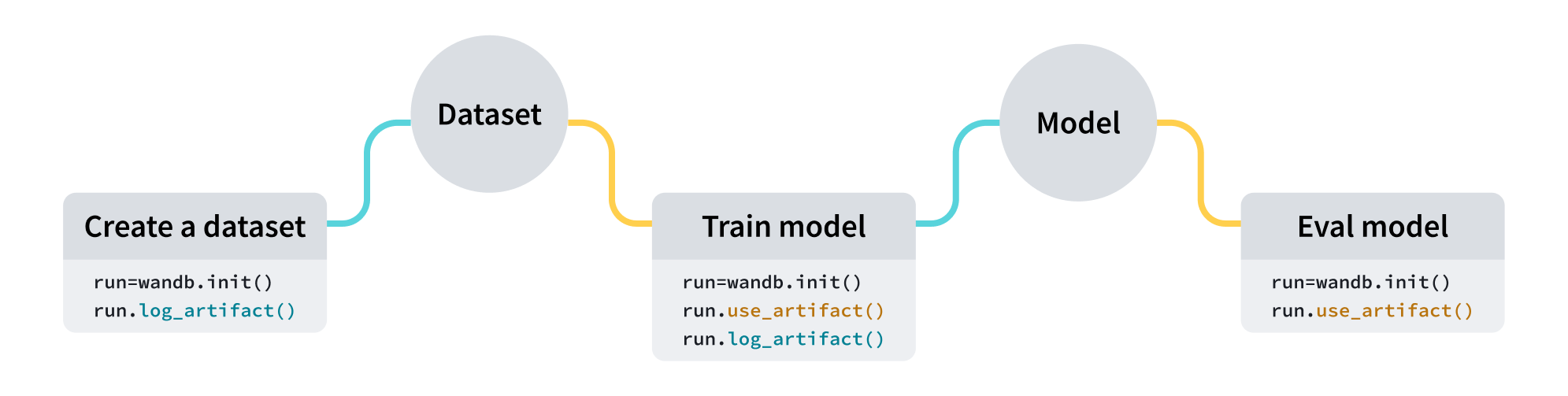 | ユースケース | 入力 | 出力 |
| ----------------------------------- | ----------------------- | ----------------------------- |
| モデルトレーニング (Model Training) | データセット (トレーニングおよび検証データ) | トレーニング済みモデル (Trained Model) |
| データセットの前処理 (Dataset Pre-Processing) | データセット (生データ) | データセット (前処理済みデータ) |
| モデルの評価 (Model Evaluation) | モデル + データセット (テストデータ) | [W\&B Table](/models/tables/) |
| モデルの最適化 (Model Optimization) | モデル | 最適化されたモデル (Optimized Model) |
以下のコードスニペットは、順番に実行することを想定しています。
## Artifacts を作成する
4 行のコードで Artifacts を作成できます。
1. [W\&B run](/models/runs/) を作成します。
2. [`wandb.Artifact`](/models/ref/python/experiments/artifact) で Artifacts オブジェクトを作成します。
3. `wandb.Artifact.add_file()` を使用して、モデルファイルやデータセットなどの 1 つ以上のファイルを Artifacts オブジェクトに追加します。
4. `wandb.Run.log_artifact()` を使用して、Artifacts を W\&B にログ記録します。
例えば、以下のコードスニペットは、 `dataset.h5` という名前のファイルを `example_artifact` という名前の Artifacts にログ記録する方法を示しています。
```python theme={null}
import wandb
# プロジェクトを作成し、データセットを追加するジョブタイプを指定して run を初期化
with wandb.init(project="artifacts-example", job_type="add-dataset") as run:
artifact = wandb.Artifact(name="example_artifact", type="dataset")
artifact.add_file(local_path="./dataset.h5", name="training_dataset")
run.log_artifact(artifact)
```
* Artifacts の `type` は、W\&B プラットフォーム上での表示方法に影響します。 `type` を指定しない場合、デフォルトで `unspecified` になります。
* ドロップダウンの各ラベルは、異なる `type` パラメータ値を表します。上記のコードスニペットでは、 Artifacts の `type` は `dataset` です。
Amazon S3 バケットなどの外部オブジェクトストレージに保存されているファイルやディレクトリーへの参照を追加する方法については、 [外部ファイルの追跡](/models/artifacts/track-external-files/) ページを参照してください。
## Artifacts をダウンロードする
[`wandb.Run.use_artifact()`](/models/ref/python/experiments/run#use_artifact) メソッドを使用して、 run の入力としてマークしたい Artifacts を指定します。
前のコードスニペットの続きとして、以下のコード例は、先ほど作成した `example_artifact` という名前の Artifacts を使用する方法を示しています。
```python theme={null}
with wandb.init(project="artifacts-example", job_type="add-dataset") as run:
# "training_dataset" Artifacts を使用する run オブジェクトを返します
artifact = run.use_artifact("training_dataset:latest")
```
これにより、 Artifacts オブジェクトが返されます。
次に、返されたオブジェクトを使用して Artifacts の全コンテンツをダウンロードします。
```python theme={null}
# デフォルトのディレクトリーに `my_data` Artifacts 全体をダウンロードします
datadir = artifact.download()
```
`root` [パラメータ](/models/ref/python/experiments/artifact) にカスタムパスを渡すことで、特定のディレクトリーに Artifacts をダウンロードできます。 Artifacts をダウンロードするその他の方法や追加のパラメータについては、 [Artifacts のダウンロードと使用](/models/artifacts/download-and-use-an-artifact/) ガイドを参照してください。
## 次のステップ
* Artifacts の [バージョン管理](/models/artifacts/create-a-new-artifact-version/) と [更新](/models/artifacts/update-an-artifact/) 方法について学びます。
* [オートメーション](/models/automations/) を使用して、 Artifacts の変更に応じてダウンストリームのワークフローをトリガーしたり、 Slack チャンネルに通知したりする方法を学びます。
* トレーニング済みモデルを収容するスペースである [registry](/models/registry/) について学びます。
* [Python SDK](/models/ref/python/experiments/artifact) および [CLI](/models/ref/cli/wandb-artifact/) のリファレンスガイドを確認します。
| ユースケース | 入力 | 出力 |
| ----------------------------------- | ----------------------- | ----------------------------- |
| モデルトレーニング (Model Training) | データセット (トレーニングおよび検証データ) | トレーニング済みモデル (Trained Model) |
| データセットの前処理 (Dataset Pre-Processing) | データセット (生データ) | データセット (前処理済みデータ) |
| モデルの評価 (Model Evaluation) | モデル + データセット (テストデータ) | [W\&B Table](/models/tables/) |
| モデルの最適化 (Model Optimization) | モデル | 最適化されたモデル (Optimized Model) |
以下のコードスニペットは、順番に実行することを想定しています。
## Artifacts を作成する
4 行のコードで Artifacts を作成できます。
1. [W\&B run](/models/runs/) を作成します。
2. [`wandb.Artifact`](/models/ref/python/experiments/artifact) で Artifacts オブジェクトを作成します。
3. `wandb.Artifact.add_file()` を使用して、モデルファイルやデータセットなどの 1 つ以上のファイルを Artifacts オブジェクトに追加します。
4. `wandb.Run.log_artifact()` を使用して、Artifacts を W\&B にログ記録します。
例えば、以下のコードスニペットは、 `dataset.h5` という名前のファイルを `example_artifact` という名前の Artifacts にログ記録する方法を示しています。
```python theme={null}
import wandb
# プロジェクトを作成し、データセットを追加するジョブタイプを指定して run を初期化
with wandb.init(project="artifacts-example", job_type="add-dataset") as run:
artifact = wandb.Artifact(name="example_artifact", type="dataset")
artifact.add_file(local_path="./dataset.h5", name="training_dataset")
run.log_artifact(artifact)
```
* Artifacts の `type` は、W\&B プラットフォーム上での表示方法に影響します。 `type` を指定しない場合、デフォルトで `unspecified` になります。
* ドロップダウンの各ラベルは、異なる `type` パラメータ値を表します。上記のコードスニペットでは、 Artifacts の `type` は `dataset` です。
Amazon S3 バケットなどの外部オブジェクトストレージに保存されているファイルやディレクトリーへの参照を追加する方法については、 [外部ファイルの追跡](/models/artifacts/track-external-files/) ページを参照してください。
## Artifacts をダウンロードする
[`wandb.Run.use_artifact()`](/models/ref/python/experiments/run#use_artifact) メソッドを使用して、 run の入力としてマークしたい Artifacts を指定します。
前のコードスニペットの続きとして、以下のコード例は、先ほど作成した `example_artifact` という名前の Artifacts を使用する方法を示しています。
```python theme={null}
with wandb.init(project="artifacts-example", job_type="add-dataset") as run:
# "training_dataset" Artifacts を使用する run オブジェクトを返します
artifact = run.use_artifact("training_dataset:latest")
```
これにより、 Artifacts オブジェクトが返されます。
次に、返されたオブジェクトを使用して Artifacts の全コンテンツをダウンロードします。
```python theme={null}
# デフォルトのディレクトリーに `my_data` Artifacts 全体をダウンロードします
datadir = artifact.download()
```
`root` [パラメータ](/models/ref/python/experiments/artifact) にカスタムパスを渡すことで、特定のディレクトリーに Artifacts をダウンロードできます。 Artifacts をダウンロードするその他の方法や追加のパラメータについては、 [Artifacts のダウンロードと使用](/models/artifacts/download-and-use-an-artifact/) ガイドを参照してください。
## 次のステップ
* Artifacts の [バージョン管理](/models/artifacts/create-a-new-artifact-version/) と [更新](/models/artifacts/update-an-artifact/) 方法について学びます。
* [オートメーション](/models/automations/) を使用して、 Artifacts の変更に応じてダウンストリームのワークフローをトリガーしたり、 Slack チャンネルに通知したりする方法を学びます。
* トレーニング済みモデルを収容するスペースである [registry](/models/registry/) について学びます。
* [Python SDK](/models/ref/python/experiments/artifact) および [CLI](/models/ref/cli/wandb-artifact/) のリファレンスガイドを確認します。