> ## Documentation Index
> Fetch the complete documentation index at: https://wb-21fd5541-serverless-sft-revamp.mintlify.site/llms.txt
> Use this file to discover all available pages before exploring further.

# DeepChecks

> W&B を DeepChecks と統合する方法。

export const ColabLink = ({url}) => <a href={url} target="_blank" rel="noopener noreferrer" className="colab-link">
    <svg width="20" height="20" viewBox="0 0 24 24" fill="currentColor" xmlns="http://www.w3.org/2000/svg">
      <path d="M14.25.18l.9.2.73.26.59.3.45.32.34.34.25.34.16.33.1.3.04.26.02.2-.01.13V8.5l-.05.63-.13.55-.21.46-.26.38-.3.31-.33.25-.35.19-.35.14-.33.1-.3.07-.26.04-.21.02H8.77l-.69.05-.59.14-.5.22-.41.27-.33.32-.27.35-.2.36-.15.37-.1.35-.07.32-.04.27-.02.21v3.06H3.17l-.21-.03-.28-.07-.32-.12-.35-.18-.36-.26-.36-.36-.35-.46-.32-.59-.28-.73-.21-.88-.14-1.05-.05-1.23.06-1.22.16-1.04.24-.87.32-.71.36-.57.4-.44.42-.33.42-.24.4-.16.36-.1.32-.05.24-.01h.16l.06.01h8.16v-.83H6.18l-.01-2.75-.02-.37.05-.34.11-.31.17-.28.25-.26.31-.23.38-.2.44-.18.51-.15.58-.12.64-.1.71-.06.77-.04.84-.02 1.27.05zm-6.3 1.98l-.23.33-.08.41.08.41.23.34.33.22.41.09.41-.09.33-.22.23-.34.08-.41-.08-.41-.23-.33-.33-.22-.41-.09-.41.09zm13.09 3.95l.28.06.32.12.35.18.36.27.36.35.35.47.32.59.28.73.21.88.14 1.04.05 1.23-.06 1.23-.16 1.04-.24.86-.32.71-.36.57-.4.45-.42.33-.42.24-.4.16-.36.09-.32.05-.24.02-.16-.01h-8.22v.82h5.84l.01 2.76.02.36-.05.34-.11.31-.17.29-.25.25-.31.24-.38.2-.44.17-.51.15-.58.13-.64.09-.71.07-.77.04-.84.01-1.27-.04-1.07-.14-.9-.2-.73-.25-.59-.3-.45-.33-.34-.34-.25-.34-.16-.33-.1-.3-.04-.25-.02-.2.01-.13v-5.34l.05-.64.13-.54.21-.46.26-.38.3-.32.33-.24.35-.2.35-.14.33-.1.3-.06.26-.04.21-.02.13-.01h5.84l.69-.05.59-.14.5-.21.41-.28.33-.32.27-.35.2-.36.15-.36.1-.35.07-.32.04-.28.02-.21V6.07h2.09l.14.01.21.03zm-6.47 14.25l-.23.33-.08.41.08.41.23.33.33.23.41.08.41-.08.33-.23.23-.33.08-.41-.08-.41-.23-.33-.33-.23-.41-.08-.41.08z" />
    </svg>
    Try in Colab
  </a>;

<ColabLink url="https://colab.research.google.com/github/deepchecks/deepchecks/blob/0.5.0-1-g5380093/docs/source/examples/guides/export_outputs_to_wandb.ipynb" />

DeepChecks は、データセットの整合性の検証、分布の検査、データ分割の妥当性確認、モデルの評価、異なるモデル間の比較など、機械学習モデルとデータのバリデーションを最小限の手間で実行できるようにサポートします。

[DeepChecks と W\&B インテグレーションの詳細はこちら ->](https://docs.deepchecks.com/stable/general/usage/exporting_results/auto_examples/plot_exports_output_to_wandb.html)

## はじめに

DeepChecks を W\&B と共に使用するには、まず [W\&B アカウント](https://wandb.ai/site) に登録する必要があります。DeepChecks の W\&B インテグレーションを使えば、以下のように素早く開始できます。

```python theme={null}
import wandb

wandb.login()

# deepchecks から check をインポート
from deepchecks.checks import ModelErrorAnalysis

# check を実行
result = ModelErrorAnalysis()

# その結果を wandb にプッシュ
result.to_wandb()
```

また、DeepChecks のテストスイート全体を W\&B にログ記録することも可能です。

```python theme={null}
import wandb

wandb.login()

# deepchecks から full_suite テストをインポート
from deepchecks.suites import full_suite

# DeepChecks テストスイートを作成して実行
suite_result = full_suite().run(...)

# これらの結果を wandb にプッシュ
# ここで必要な wandb.init の設定や引数を渡すことができます
suite_result.to_wandb(project="my-suite-project", config={"suite-name": "full-suite"})
```

## 例

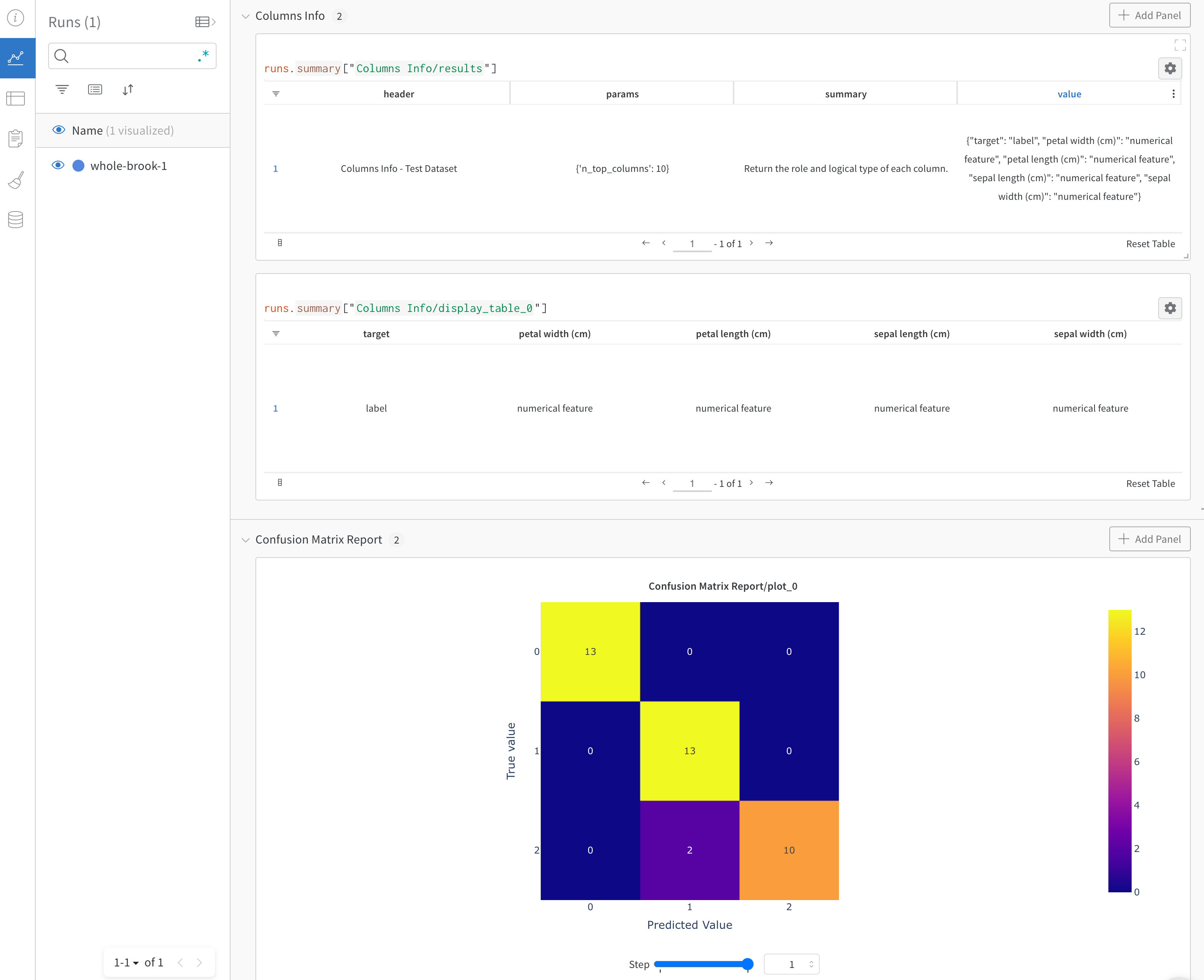
[こちらの Reports](https://wandb.ai/cayush/deepchecks/reports/Validate-your-Data-and-Models-with-Deepchecks-and-W-B--VmlldzoxNjY0ODc5) では、DeepChecks と W\&B を組み合わせた際の効果を確認できます。
<Frame>
  <img src="https://mintcdn.com/wb-21fd5541-serverless-sft-revamp/IRi-6mj09rKBO-jh/images/integrations/deepchecks_example.png?fit=max&auto=format&n=IRi-6mj09rKBO-jh&q=85&s=bc698bf6e708e84c88fc99acfadd3dfc" alt="Deepchecks data validation results" width="3102" height="2526" data-path="images/integrations/deepchecks_example.png" />
</Frame>

この W\&B インテグレーションに関するご質問や問題がある場合は、[DeepChecks の GitHub リポジトリ](https://github.com/deepchecks/deepchecks) で Issue を作成してください。内容を確認し、回答させていただきます。
