> ## Documentation Index
> Fetch the complete documentation index at: https://wb-21fd5541-serverless-sft-revamp.mintlify.site/llms.txt
> Use this file to discover all available pages before exploring further.
# DeepChem
> W&B を DeepChem ライブラリ と統合する方法。
[DeepChem ライブラリ](https://github.com/deepchem/deepchem) は、創薬、材料科学、化学、生物学におけるディープラーニングの利用を民主化するオープンソース ツールを提供しています。この W\&B インテグレーションにより、DeepChem を使用したモデルのトレーニング中に、シンプルで使いやすい 実験管理 とモデルの チェックポイント 保存機能が追加されます。
## 3行のコードで DeepChem のログを記録
```python theme={null}
logger = WandbLogger(…)
model = TorchModel(…, wandb_logger=logger)
model.fit(…)
```
 ## レポートと Google Colab
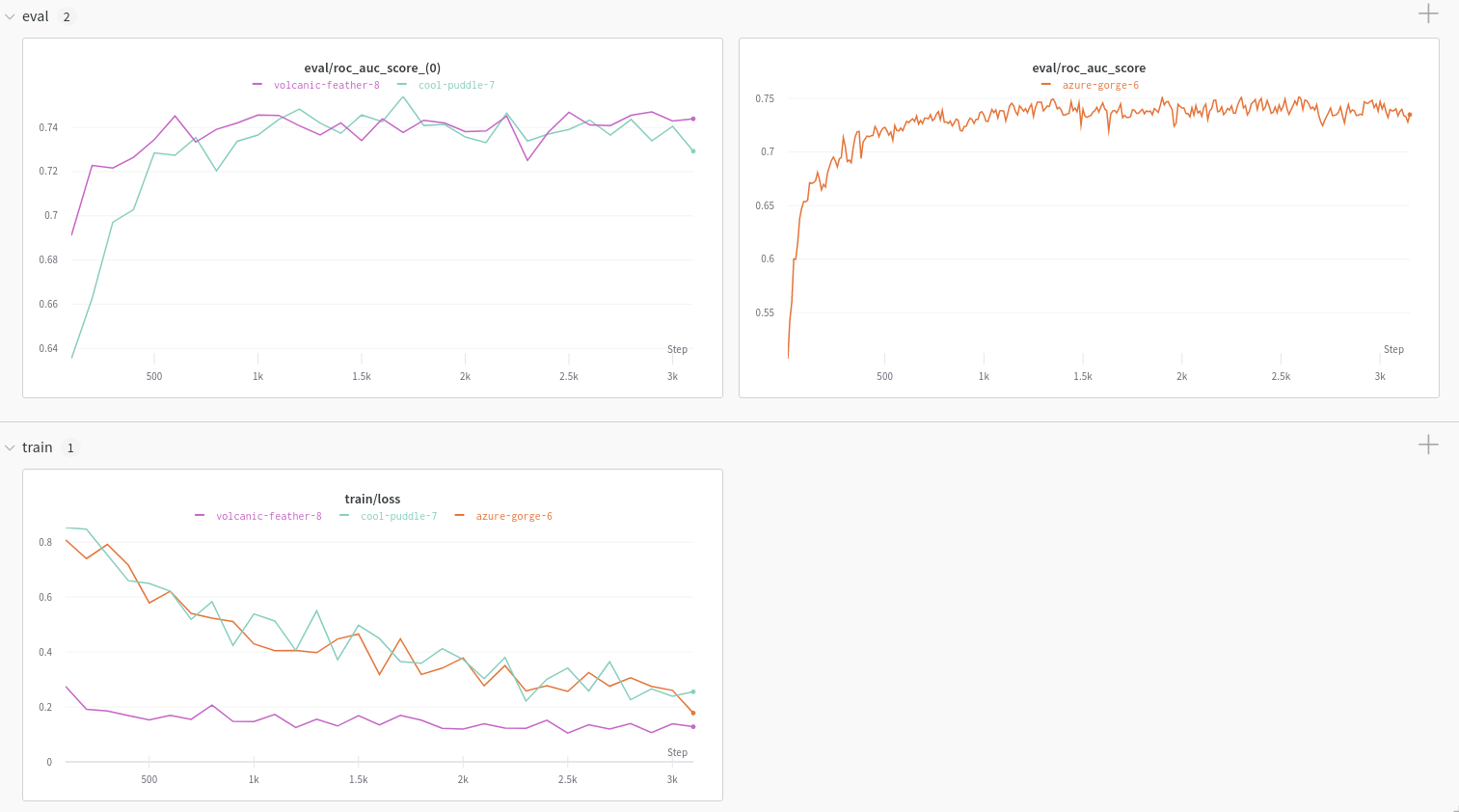
W\&B DeepChem インテグレーションを使用して生成されたチャートの例については、記事「 [Using W\&B with DeepChem: Molecular Graph Convolutional Networks](https://wandb.ai/kshen/deepchem_graphconv/reports/Using-W-B-with-DeepChem-Molecular-Graph-Convolutional-Networks--Vmlldzo4MzU5MDc?galleryTag=) 」をご覧ください。
すぐに実行可能な コード を確認するには、こちらの [Google Colab](https://colab.research.google.com/github/wandb/examples/blob/master/colabs/deepchem/W%26B_x_DeepChem.ipynb) をチェックしてください。
## 実験 (Experiments) を追跡する
[KerasModel](https://deepchem.readthedocs.io/en/latest/api_reference/models.html#keras-models) または [TorchModel](https://deepchem.readthedocs.io/en/latest/api_reference/models.html#pytorch-models) タイプの DeepChem モデルに対して W\&B を設定します。
### サインアップと APIキー の作成
APIキー は、マシンを W\&B に対して認証するために使用されます。 APIキー は ユーザー プロフィールから生成できます。
For a more streamlined approach, create an API key by going directly to [User Settings](https://wandb.ai/settings). Copy the newly created API key immediately and save it in a secure location such as a password manager.
1. 右上隅にある ユーザー プロフィールアイコンをクリックします。
2. **User Settings** を選択し、 **API Keys** セクションまでスクロールします。
### `wandb` ライブラリのインストールとログイン
ローカルに `wandb` ライブラリをインストールしてログインする方法:
1. `WANDB_API_KEY` [環境変数](/models/track/environment-variables/) に APIキー を設定します。
```bash theme={null}
export WANDB_API_KEY=
```
2. `wandb` ライブラリをインストールしてログインします。
```shell theme={null}
pip install wandb
wandb login
```
```bash theme={null}
pip install wandb
```
```python theme={null}
import wandb
wandb.login()
```
```notebook theme={null}
!pip install wandb
import wandb
wandb.login()
```
### トレーニングと評価のデータを W\&B にログ記録する
トレーニングの損失(loss)と 評価メトリクス は、自動的に W\&B に ログ 記録されます。DeepChem の [ValidationCallback](https://github.com/deepchem/deepchem/blob/master/deepchem/models/callbacks.py) を使用してオプションの評価を有効にすると、 `WandbLogger` は `ValidationCallback` コールバック を検出し、生成された メトリクス を ログ 記録します。
```python theme={null}
from deepchem.models import TorchModel, ValidationCallback
vc = ValidationCallback(…) # オプション
model = TorchModel(…, wandb_logger=logger)
model.fit(…, callbacks=[vc])
logger.finish()
```
```python theme={null}
from deepchem.models import KerasModel, ValidationCallback
vc = ValidationCallback(…) # オプション
model = KerasModel(…, wandb_logger=logger)
model.fit(…, callbacks=[vc])
logger.finish()
```
## レポートと Google Colab
W\&B DeepChem インテグレーションを使用して生成されたチャートの例については、記事「 [Using W\&B with DeepChem: Molecular Graph Convolutional Networks](https://wandb.ai/kshen/deepchem_graphconv/reports/Using-W-B-with-DeepChem-Molecular-Graph-Convolutional-Networks--Vmlldzo4MzU5MDc?galleryTag=) 」をご覧ください。
すぐに実行可能な コード を確認するには、こちらの [Google Colab](https://colab.research.google.com/github/wandb/examples/blob/master/colabs/deepchem/W%26B_x_DeepChem.ipynb) をチェックしてください。
## 実験 (Experiments) を追跡する
[KerasModel](https://deepchem.readthedocs.io/en/latest/api_reference/models.html#keras-models) または [TorchModel](https://deepchem.readthedocs.io/en/latest/api_reference/models.html#pytorch-models) タイプの DeepChem モデルに対して W\&B を設定します。
### サインアップと APIキー の作成
APIキー は、マシンを W\&B に対して認証するために使用されます。 APIキー は ユーザー プロフィールから生成できます。
For a more streamlined approach, create an API key by going directly to [User Settings](https://wandb.ai/settings). Copy the newly created API key immediately and save it in a secure location such as a password manager.
1. 右上隅にある ユーザー プロフィールアイコンをクリックします。
2. **User Settings** を選択し、 **API Keys** セクションまでスクロールします。
### `wandb` ライブラリのインストールとログイン
ローカルに `wandb` ライブラリをインストールしてログインする方法:
1. `WANDB_API_KEY` [環境変数](/models/track/environment-variables/) に APIキー を設定します。
```bash theme={null}
export WANDB_API_KEY=
```
2. `wandb` ライブラリをインストールしてログインします。
```shell theme={null}
pip install wandb
wandb login
```
```bash theme={null}
pip install wandb
```
```python theme={null}
import wandb
wandb.login()
```
```notebook theme={null}
!pip install wandb
import wandb
wandb.login()
```
### トレーニングと評価のデータを W\&B にログ記録する
トレーニングの損失(loss)と 評価メトリクス は、自動的に W\&B に ログ 記録されます。DeepChem の [ValidationCallback](https://github.com/deepchem/deepchem/blob/master/deepchem/models/callbacks.py) を使用してオプションの評価を有効にすると、 `WandbLogger` は `ValidationCallback` コールバック を検出し、生成された メトリクス を ログ 記録します。
```python theme={null}
from deepchem.models import TorchModel, ValidationCallback
vc = ValidationCallback(…) # オプション
model = TorchModel(…, wandb_logger=logger)
model.fit(…, callbacks=[vc])
logger.finish()
```
```python theme={null}
from deepchem.models import KerasModel, ValidationCallback
vc = ValidationCallback(…) # オプション
model = KerasModel(…, wandb_logger=logger)
model.fit(…, callbacks=[vc])
logger.finish()
```