> ## Documentation Index
> Fetch the complete documentation index at: https://wb-21fd5541-serverless-sft-revamp.mintlify.site/llms.txt
> Use this file to discover all available pages before exploring further.
# Hugging Face Diffusers
export const ColabLink = ({url}) =>
Try in Colab
;
[Hugging Face Diffusers](https://huggingface.co/docs/diffusers) は、画像、オーディオ、さらには分子の3D構造を生成するための、最先端の学習済み拡散モデル(diffusion models)を利用するための主要なライブラリです。W\&B インテグレーションを使用すると、その使いやすさを損なうことなく、リッチで柔軟な 実験管理 、メディアの 可視化 、パイプラインの アーキテクチャー 、および 設定 管理を、インタラクティブで中央集約的な ダッシュボード に追加できます。
## わずか2行で次世代のロギングを実現
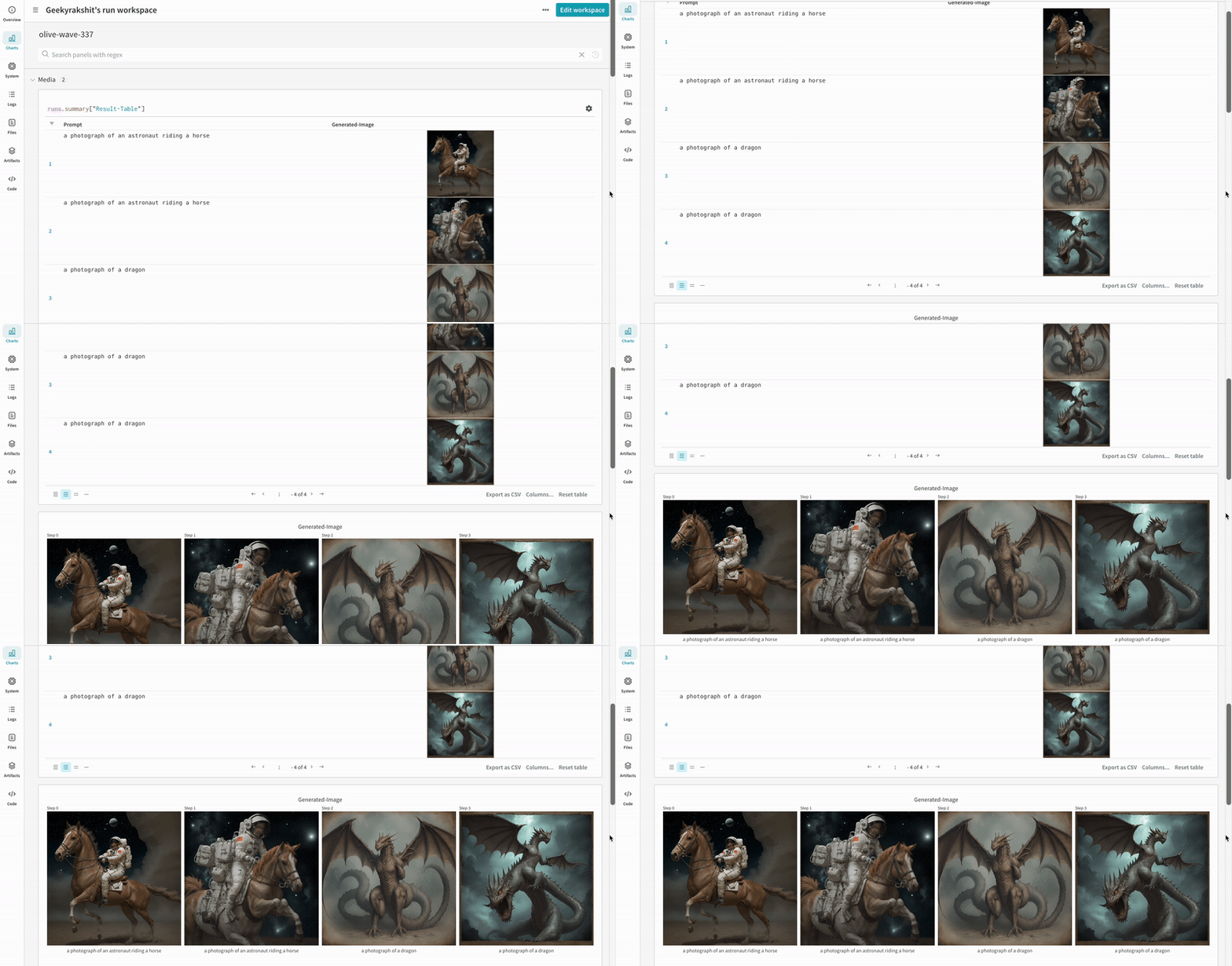
わずか2行の コード を追加するだけで、実験に関連するすべてのプロンプト、ネガティブプロンプト、生成されたメディア、および 設定 を ログ に記録できます。ロギングを開始するための2行の コード は以下の通りです。
```python theme={null}
# autolog関数をインポート
from wandb.integration.diffusers import autolog
# パイプラインを呼び出す前にautologを呼び出す
autolog(init=dict(project="diffusers_logging"))
```
 ## はじめる
1. `diffusers`, `transformers`, `accelerate`, および `wandb` をインストールします。
* コマンドライン :
```shell theme={null}
pip install --upgrade diffusers transformers accelerate wandb
```
* ノートブック :
```bash theme={null}
!pip install --upgrade diffusers transformers accelerate wandb
```
2. `autolog` を使用して W\&B Run を初期化し、[サポートされているすべてのパイプライン呼び出し](https://github.com/wandb/wandb/blob/main/wandb/integration/diffusers/autologger.py#L12-L72) からの入力と出力を自動的に追跡します。
`autolog()` 関数は `init` パラメータ を使用して呼び出すことができます。これには [`wandb.init()`](/models/ref/python/functions/init) で必要な パラメータ の 辞書 を渡します。
`autolog()` を呼び出すと、W\&B Run が初期化され、[サポートされているすべてのパイプライン呼び出し](https://github.com/wandb/wandb/blob/main/wandb/integration/diffusers/autologger.py#L12-L72) からの入力と出力が自動的に追跡されます。
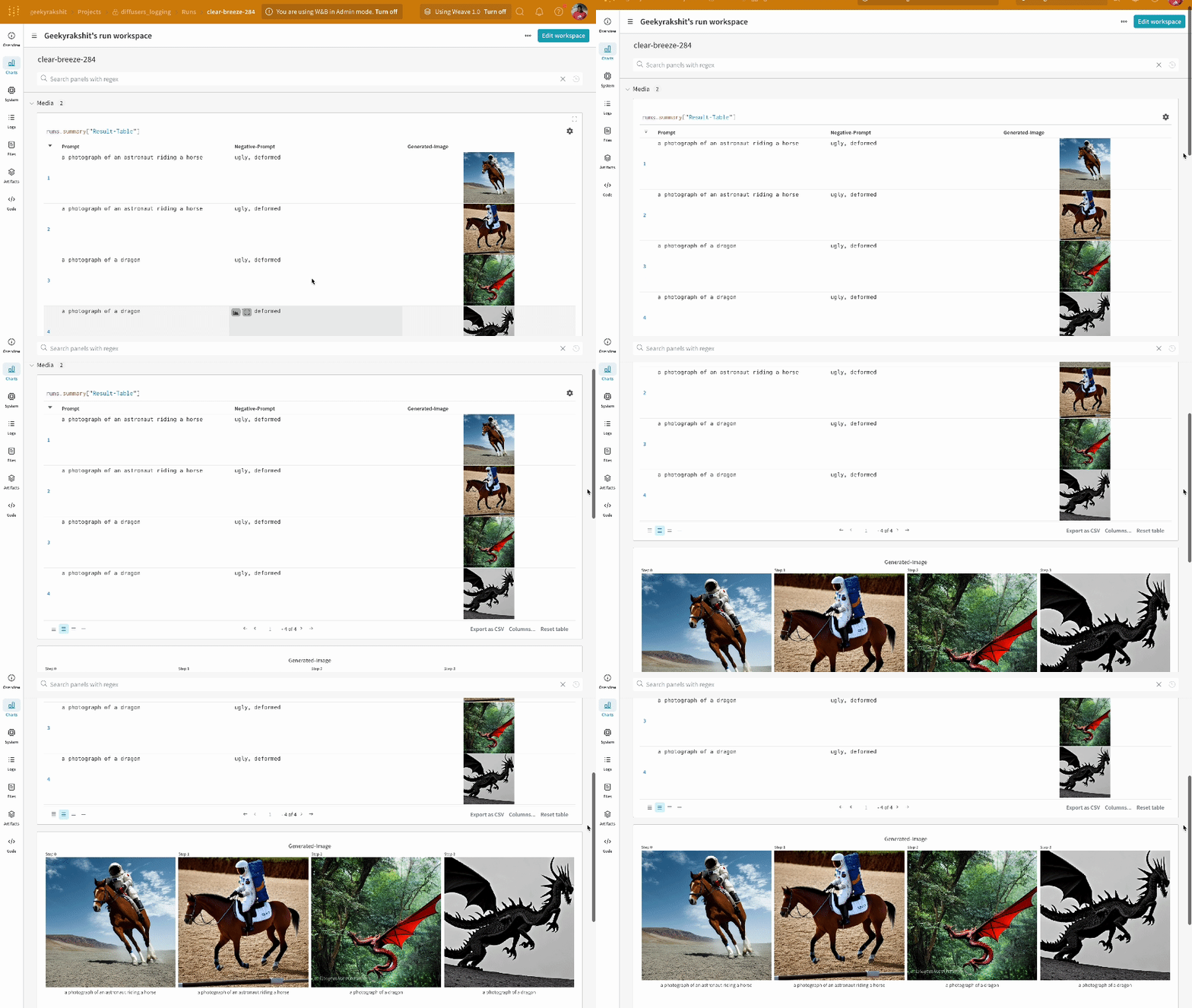
* 各パイプライン呼び出しは、Workspace 内の独自の [テーブル](/models/tables/) に追跡され、パイプライン呼び出しに関連付けられた 設定 は、その Run の 設定 内の ワークフロー リストに追加されます。
* プロンプト、ネガティブプロンプト、および生成されたメディアは [`wandb.Table`](/models/tables/) に ログ 記録されます。
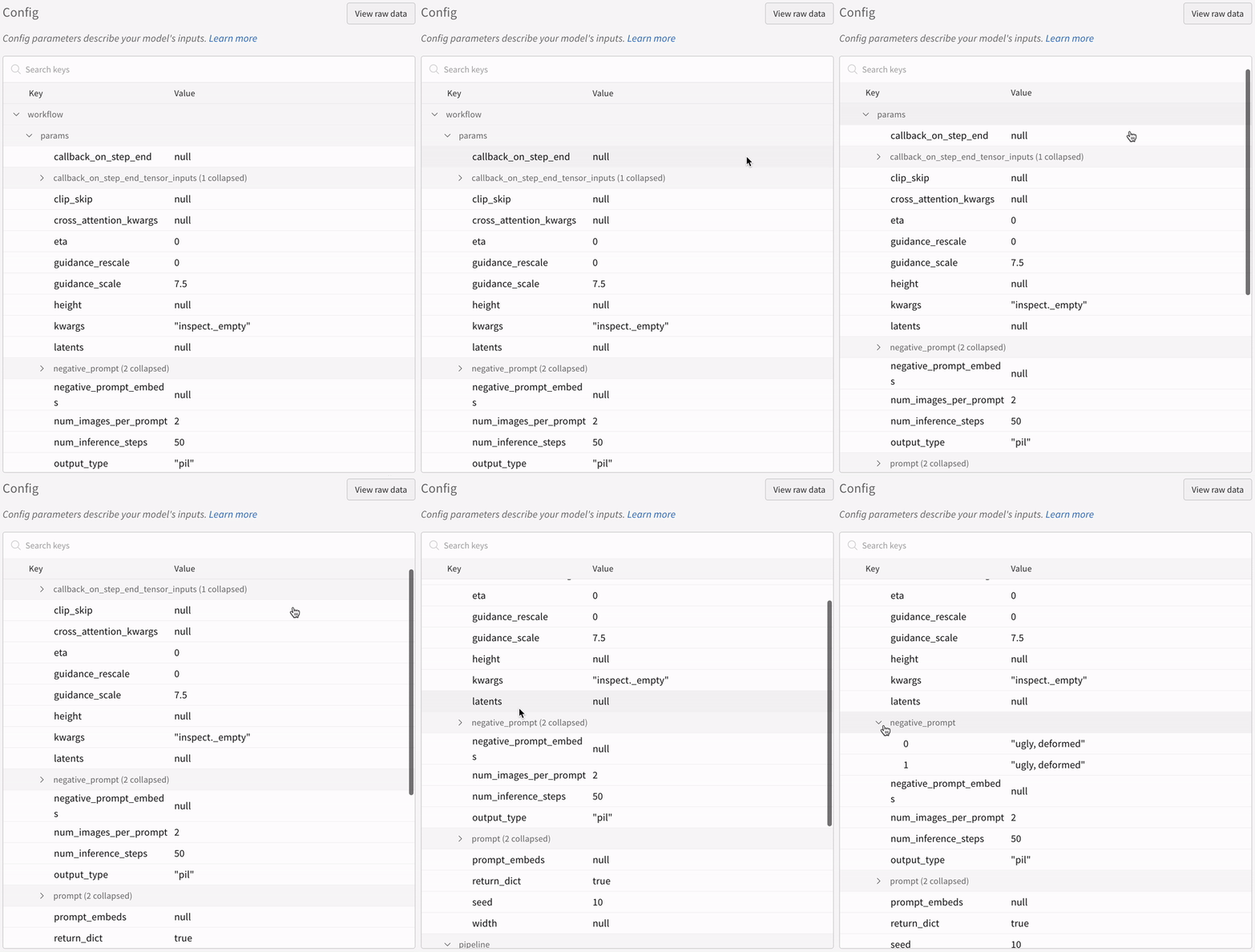
* シードやパイプライン アーキテクチャー を含む、実験に関連するその他すべての 設定 は、Run の config セクションに保存されます。
* 各パイプライン呼び出しで生成されたメディアは、Run 内の [メディアパネル](/models/track/log/media/) にも ログ 記録されます。
[サポートされているパイプライン呼び出しのリスト](https://github.com/wandb/wandb/blob/main/wandb/integration/diffusers/autologger.py#L12-L72) を確認できます。このインテグレーションの新機能のリクエストや、関連するバグの報告が必要な場合は、[W\&B GitHub issues ページ](https://github.com/wandb/wandb/issues) で issue を作成してください。
## 例
### オートロギング (Autologging)
以下は、autolog が動作する簡単な エンドツーエンド の例です。
```python theme={null}
import torch
from diffusers import DiffusionPipeline
# autolog関数をインポート
from wandb.integration.diffusers import autolog
# パイプラインを呼び出す前にautologを呼び出す
autolog(init=dict(project="diffusers_logging"))
# 拡散パイプラインを初期化
pipeline = DiffusionPipeline.from_pretrained(
"stabilityai/stable-diffusion-2-1", torch_dtype=torch.float16
).to("cuda")
# プロンプト、ネガティブプロンプト、およびシードを定義
prompt = ["a photograph of an astronaut riding a horse", "a photograph of a dragon"]
negative_prompt = ["ugly, deformed", "ugly, deformed"]
generator = torch.Generator(device="cpu").manual_seed(10)
# パイプラインを呼び出して画像を生成
images = pipeline(
prompt,
negative_prompt=negative_prompt,
num_images_per_prompt=2,
generator=generator,
)
```
```python theme={null}
import torch
from diffusers import DiffusionPipeline
import wandb
# autolog関数をインポート
from wandb.integration.diffusers import autolog
run = wandb.init()
# パイプラインを呼び出す前にautologを呼び出す
autolog(init=dict(project="diffusers_logging"))
# 拡散パイプラインを初期化
pipeline = DiffusionPipeline.from_pretrained(
"stabilityai/stable-diffusion-2-1", torch_dtype=torch.float16
).to("cuda")
# プロンプト、ネガティブプロンプト、およびシードを定義
prompt = ["a photograph of an astronaut riding a horse", "a photograph of a dragon"]
negative_prompt = ["ugly, deformed", "ugly, deformed"]
generator = torch.Generator(device="cpu").manual_seed(10)
# パイプラインを呼び出して画像を生成
images = pipeline(
prompt,
negative_prompt=negative_prompt,
num_images_per_prompt=2,
generator=generator,
)
# 実験を終了
run.finish()
```
* 単一の 実験 の 結果 :
## はじめる
1. `diffusers`, `transformers`, `accelerate`, および `wandb` をインストールします。
* コマンドライン :
```shell theme={null}
pip install --upgrade diffusers transformers accelerate wandb
```
* ノートブック :
```bash theme={null}
!pip install --upgrade diffusers transformers accelerate wandb
```
2. `autolog` を使用して W\&B Run を初期化し、[サポートされているすべてのパイプライン呼び出し](https://github.com/wandb/wandb/blob/main/wandb/integration/diffusers/autologger.py#L12-L72) からの入力と出力を自動的に追跡します。
`autolog()` 関数は `init` パラメータ を使用して呼び出すことができます。これには [`wandb.init()`](/models/ref/python/functions/init) で必要な パラメータ の 辞書 を渡します。
`autolog()` を呼び出すと、W\&B Run が初期化され、[サポートされているすべてのパイプライン呼び出し](https://github.com/wandb/wandb/blob/main/wandb/integration/diffusers/autologger.py#L12-L72) からの入力と出力が自動的に追跡されます。
* 各パイプライン呼び出しは、Workspace 内の独自の [テーブル](/models/tables/) に追跡され、パイプライン呼び出しに関連付けられた 設定 は、その Run の 設定 内の ワークフロー リストに追加されます。
* プロンプト、ネガティブプロンプト、および生成されたメディアは [`wandb.Table`](/models/tables/) に ログ 記録されます。
* シードやパイプライン アーキテクチャー を含む、実験に関連するその他すべての 設定 は、Run の config セクションに保存されます。
* 各パイプライン呼び出しで生成されたメディアは、Run 内の [メディアパネル](/models/track/log/media/) にも ログ 記録されます。
[サポートされているパイプライン呼び出しのリスト](https://github.com/wandb/wandb/blob/main/wandb/integration/diffusers/autologger.py#L12-L72) を確認できます。このインテグレーションの新機能のリクエストや、関連するバグの報告が必要な場合は、[W\&B GitHub issues ページ](https://github.com/wandb/wandb/issues) で issue を作成してください。
## 例
### オートロギング (Autologging)
以下は、autolog が動作する簡単な エンドツーエンド の例です。
```python theme={null}
import torch
from diffusers import DiffusionPipeline
# autolog関数をインポート
from wandb.integration.diffusers import autolog
# パイプラインを呼び出す前にautologを呼び出す
autolog(init=dict(project="diffusers_logging"))
# 拡散パイプラインを初期化
pipeline = DiffusionPipeline.from_pretrained(
"stabilityai/stable-diffusion-2-1", torch_dtype=torch.float16
).to("cuda")
# プロンプト、ネガティブプロンプト、およびシードを定義
prompt = ["a photograph of an astronaut riding a horse", "a photograph of a dragon"]
negative_prompt = ["ugly, deformed", "ugly, deformed"]
generator = torch.Generator(device="cpu").manual_seed(10)
# パイプラインを呼び出して画像を生成
images = pipeline(
prompt,
negative_prompt=negative_prompt,
num_images_per_prompt=2,
generator=generator,
)
```
```python theme={null}
import torch
from diffusers import DiffusionPipeline
import wandb
# autolog関数をインポート
from wandb.integration.diffusers import autolog
run = wandb.init()
# パイプラインを呼び出す前にautologを呼び出す
autolog(init=dict(project="diffusers_logging"))
# 拡散パイプラインを初期化
pipeline = DiffusionPipeline.from_pretrained(
"stabilityai/stable-diffusion-2-1", torch_dtype=torch.float16
).to("cuda")
# プロンプト、ネガティブプロンプト、およびシードを定義
prompt = ["a photograph of an astronaut riding a horse", "a photograph of a dragon"]
negative_prompt = ["ugly, deformed", "ugly, deformed"]
generator = torch.Generator(device="cpu").manual_seed(10)
# パイプラインを呼び出して画像を生成
images = pipeline(
prompt,
negative_prompt=negative_prompt,
num_images_per_prompt=2,
generator=generator,
)
# 実験を終了
run.finish()
```
* 単一の 実験 の 結果 :
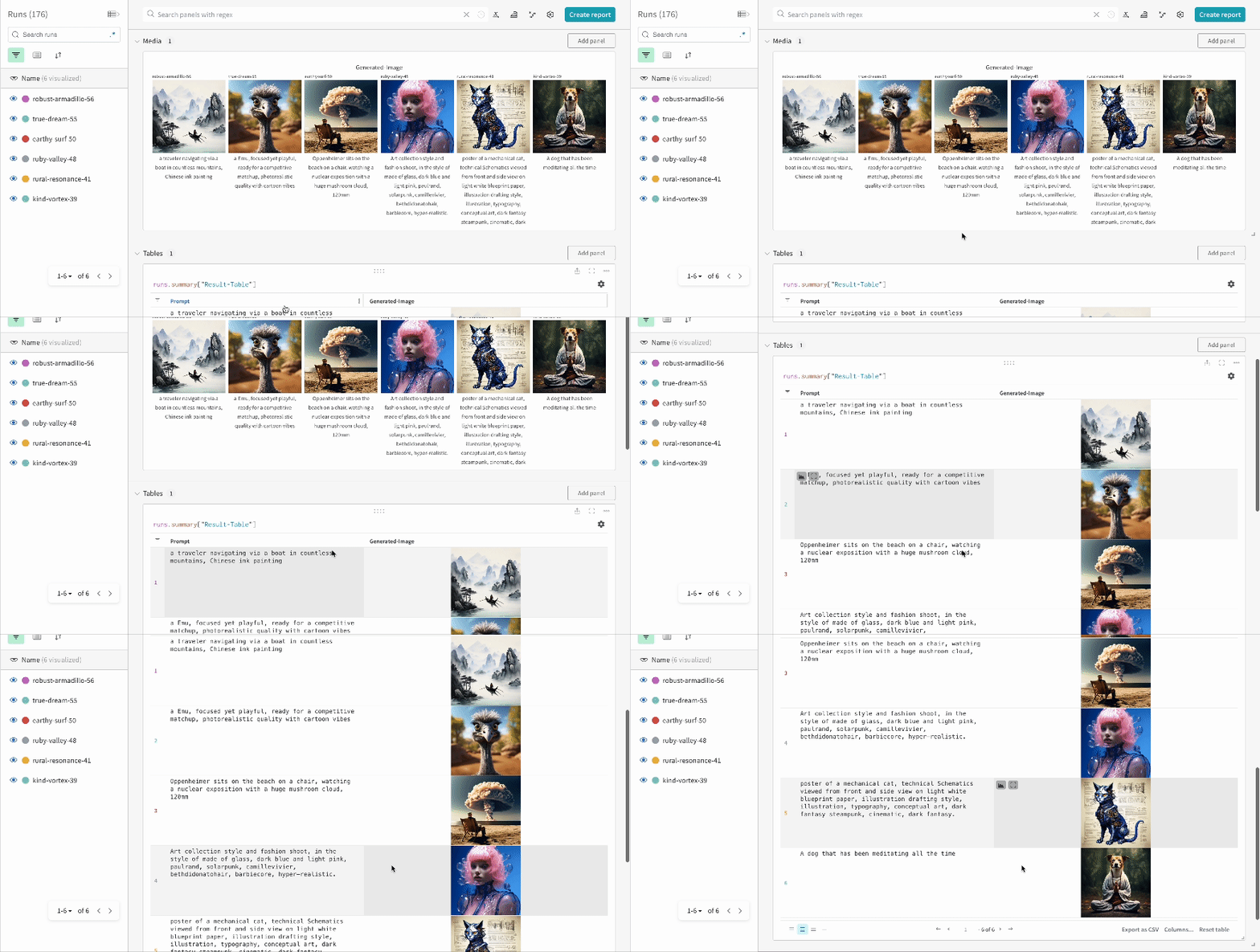
 * 複数の 実験 の 結果 :
 * 実験 の 設定 (config) :
 IPython ノートブック 環境で コード を実行する場合、パイプラインを呼び出した後に明示的に [`wandb.Run.finish()`](/models/ref/python/functions/finish) を呼び出す必要があります。Python スクリプト を実行する場合には、これは必要ありません。
### マルチパイプライン ワークフロー の追跡
このセクションでは、一般的な [Stable Diffusion XL + Refiner](https://huggingface.co/docs/diffusers/using-diffusers/sdxl#base-to-refiner-model) ワークフロー での autolog の使用例を示します。この ワークフロー では、[`StableDiffusionXLPipeline`](https://huggingface.co/docs/diffusers/api/pipelines/stable_diffusion/stable_diffusion_xl) によって生成された latents が、対応する refiner によって洗練されます。
```python theme={null}
import torch
from diffusers import StableDiffusionXLImg2ImgPipeline, StableDiffusionXLPipeline
from wandb.integration.diffusers import autolog
# SDXL base パイプラインを初期化
base_pipeline = StableDiffusionXLPipeline.from_pretrained(
"stabilityai/stable-diffusion-xl-base-1.0",
torch_dtype=torch.float16,
variant="fp16",
use_safetensors=True,
)
base_pipeline.enable_model_cpu_offload()
# SDXL refiner パイプラインを初期化
refiner_pipeline = StableDiffusionXLImg2ImgPipeline.from_pretrained(
"stabilityai/stable-diffusion-xl-refiner-1.0",
text_encoder_2=base_pipeline.text_encoder_2,
vae=base_pipeline.vae,
torch_dtype=torch.float16,
use_safetensors=True,
variant="fp16",
)
refiner_pipeline.enable_model_cpu_offload()
prompt = "a photo of an astronaut riding a horse on mars"
negative_prompt = "static, frame, painting, illustration, sd character, low quality, low resolution, greyscale, monochrome, nose, cropped, lowres, jpeg artifacts, deformed iris, deformed pupils, bad eyes, semi-realistic worst quality, bad lips, deformed mouth, deformed face, deformed fingers, deformed toes standing still, posing"
# 乱数を制御して実験の再現性を確保
# シード値は自動的にWandBにログ記録されます
seed = 42
generator_base = torch.Generator(device="cuda").manual_seed(seed)
generator_refiner = torch.Generator(device="cuda").manual_seed(seed)
# Diffusers用のW&B Autologを呼び出す
# これにより、プロンプト、生成された画像、パイプラインアーキテクチャー、
# および関連するすべての実験設定がW&Bに自動的にログ記録され、
# 画像生成実験の再現、共有、分析が容易になります。
autolog(init=dict(project="sdxl"))
# base パイプラインを呼び出して latents を生成
image = base_pipeline(
prompt=prompt,
negative_prompt=negative_prompt,
output_type="latent",
generator=generator_base,
).images[0]
# refiner パイプラインを呼び出して洗練された画像を生成
image = refiner_pipeline(
prompt=prompt,
negative_prompt=negative_prompt,
image=image[None, :],
generator=generator_refiner,
).images[0]
```
```python theme={null}
import torch
from diffusers import StableDiffusionXLImg2ImgPipeline, StableDiffusionXLPipeline
import wandb
from wandb.integration.diffusers import autolog
run = wandb.init()
# SDXL base パイプラインを初期化
base_pipeline = StableDiffusionXLPipeline.from_pretrained(
"stabilityai/stable-diffusion-xl-base-1.0",
torch_dtype=torch.float16,
variant="fp16",
use_safetensors=True,
)
base_pipeline.enable_model_cpu_offload()
# SDXL refiner パイプラインを初期化
refiner_pipeline = StableDiffusionXLImg2ImgPipeline.from_pretrained(
"stabilityai/stable-diffusion-xl-refiner-1.0",
text_encoder_2=base_pipeline.text_encoder_2,
vae=base_pipeline.vae,
torch_dtype=torch.float16,
use_safetensors=True,
variant="fp16",
)
refiner_pipeline.enable_model_cpu_offload()
prompt = "a photo of an astronaut riding a horse on mars"
negative_prompt = "static, frame, painting, illustration, sd character, low quality, low resolution, greyscale, monochrome, nose, cropped, lowres, jpeg artifacts, deformed iris, deformed pupils, bad eyes, semi-realistic worst quality, bad lips, deformed mouth, deformed face, deformed fingers, deformed toes standing still, posing"
# 乱数を制御して実験の再現性を確保
# シード値は自動的にWandBにログ記録されます
seed = 42
generator_base = torch.Generator(device="cuda").manual_seed(seed)
generator_refiner = torch.Generator(device="cuda").manual_seed(seed)
# Diffusers用のW&B Autologを呼び出す
# これにより、プロンプト、生成された画像、パイプラインアーキテクチャー、
# および関連するすべての実験設定がW&Bに自動的にログ記録され、
# 画像生成実験の再現、共有、分析が容易になります。
autolog(init=dict(project="sdxl"))
# base パイプラインを呼び出して latents を生成
image = base_pipeline(
prompt=prompt,
negative_prompt=negative_prompt,
output_type="latent",
generator=generator_base,
).images[0]
# refiner パイプラインを呼び出して洗練された画像を生成
image = refiner_pipeline(
prompt=prompt,
negative_prompt=negative_prompt,
image=image[None, :],
generator=generator_refiner,
).images[0]
# 実験を終了
run.finish()
```
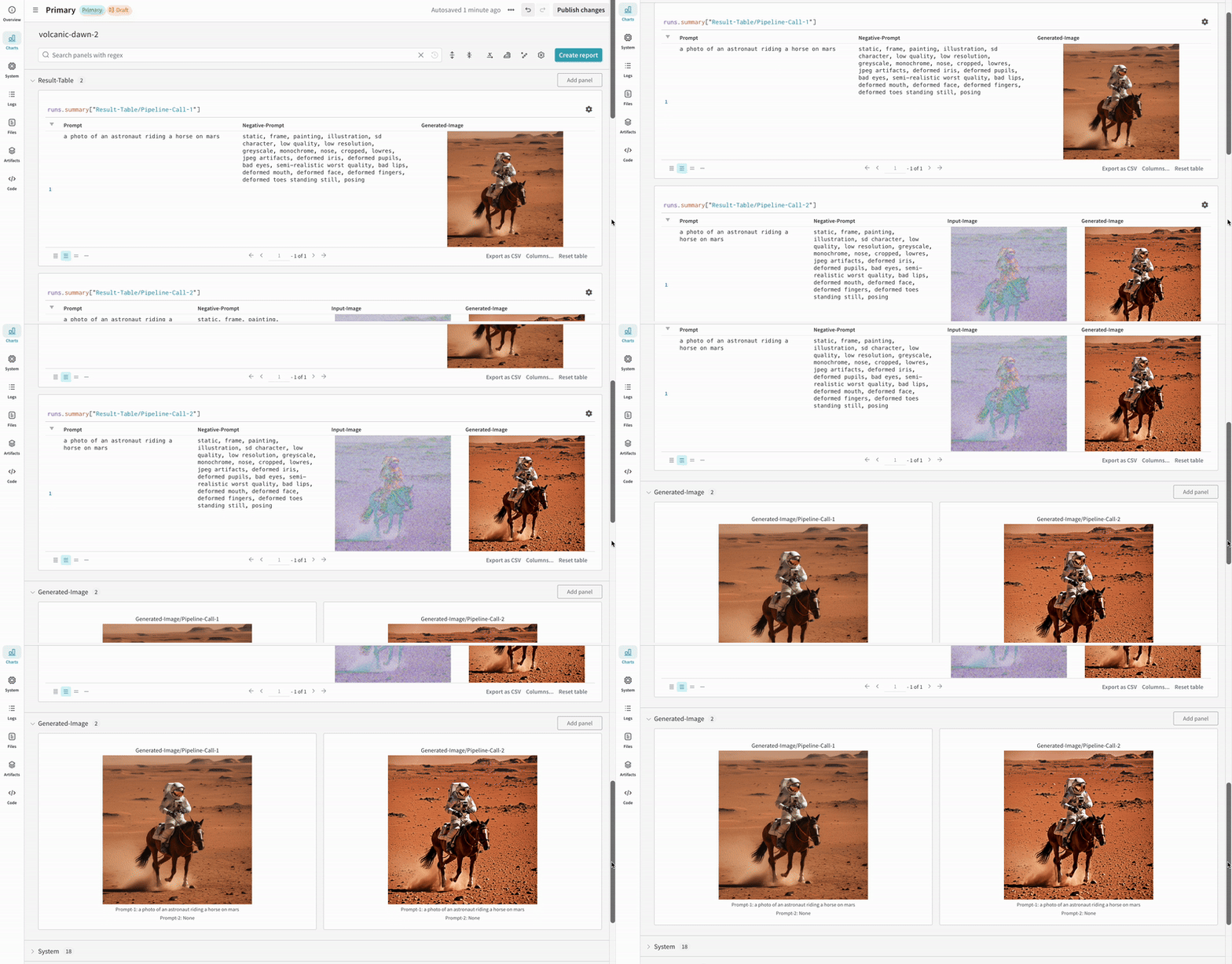
* Stable Diffusion XL + Refiner の 実験 例 :
IPython ノートブック 環境で コード を実行する場合、パイプラインを呼び出した後に明示的に [`wandb.Run.finish()`](/models/ref/python/functions/finish) を呼び出す必要があります。Python スクリプト を実行する場合には、これは必要ありません。
### マルチパイプライン ワークフロー の追跡
このセクションでは、一般的な [Stable Diffusion XL + Refiner](https://huggingface.co/docs/diffusers/using-diffusers/sdxl#base-to-refiner-model) ワークフロー での autolog の使用例を示します。この ワークフロー では、[`StableDiffusionXLPipeline`](https://huggingface.co/docs/diffusers/api/pipelines/stable_diffusion/stable_diffusion_xl) によって生成された latents が、対応する refiner によって洗練されます。
```python theme={null}
import torch
from diffusers import StableDiffusionXLImg2ImgPipeline, StableDiffusionXLPipeline
from wandb.integration.diffusers import autolog
# SDXL base パイプラインを初期化
base_pipeline = StableDiffusionXLPipeline.from_pretrained(
"stabilityai/stable-diffusion-xl-base-1.0",
torch_dtype=torch.float16,
variant="fp16",
use_safetensors=True,
)
base_pipeline.enable_model_cpu_offload()
# SDXL refiner パイプラインを初期化
refiner_pipeline = StableDiffusionXLImg2ImgPipeline.from_pretrained(
"stabilityai/stable-diffusion-xl-refiner-1.0",
text_encoder_2=base_pipeline.text_encoder_2,
vae=base_pipeline.vae,
torch_dtype=torch.float16,
use_safetensors=True,
variant="fp16",
)
refiner_pipeline.enable_model_cpu_offload()
prompt = "a photo of an astronaut riding a horse on mars"
negative_prompt = "static, frame, painting, illustration, sd character, low quality, low resolution, greyscale, monochrome, nose, cropped, lowres, jpeg artifacts, deformed iris, deformed pupils, bad eyes, semi-realistic worst quality, bad lips, deformed mouth, deformed face, deformed fingers, deformed toes standing still, posing"
# 乱数を制御して実験の再現性を確保
# シード値は自動的にWandBにログ記録されます
seed = 42
generator_base = torch.Generator(device="cuda").manual_seed(seed)
generator_refiner = torch.Generator(device="cuda").manual_seed(seed)
# Diffusers用のW&B Autologを呼び出す
# これにより、プロンプト、生成された画像、パイプラインアーキテクチャー、
# および関連するすべての実験設定がW&Bに自動的にログ記録され、
# 画像生成実験の再現、共有、分析が容易になります。
autolog(init=dict(project="sdxl"))
# base パイプラインを呼び出して latents を生成
image = base_pipeline(
prompt=prompt,
negative_prompt=negative_prompt,
output_type="latent",
generator=generator_base,
).images[0]
# refiner パイプラインを呼び出して洗練された画像を生成
image = refiner_pipeline(
prompt=prompt,
negative_prompt=negative_prompt,
image=image[None, :],
generator=generator_refiner,
).images[0]
```
```python theme={null}
import torch
from diffusers import StableDiffusionXLImg2ImgPipeline, StableDiffusionXLPipeline
import wandb
from wandb.integration.diffusers import autolog
run = wandb.init()
# SDXL base パイプラインを初期化
base_pipeline = StableDiffusionXLPipeline.from_pretrained(
"stabilityai/stable-diffusion-xl-base-1.0",
torch_dtype=torch.float16,
variant="fp16",
use_safetensors=True,
)
base_pipeline.enable_model_cpu_offload()
# SDXL refiner パイプラインを初期化
refiner_pipeline = StableDiffusionXLImg2ImgPipeline.from_pretrained(
"stabilityai/stable-diffusion-xl-refiner-1.0",
text_encoder_2=base_pipeline.text_encoder_2,
vae=base_pipeline.vae,
torch_dtype=torch.float16,
use_safetensors=True,
variant="fp16",
)
refiner_pipeline.enable_model_cpu_offload()
prompt = "a photo of an astronaut riding a horse on mars"
negative_prompt = "static, frame, painting, illustration, sd character, low quality, low resolution, greyscale, monochrome, nose, cropped, lowres, jpeg artifacts, deformed iris, deformed pupils, bad eyes, semi-realistic worst quality, bad lips, deformed mouth, deformed face, deformed fingers, deformed toes standing still, posing"
# 乱数を制御して実験の再現性を確保
# シード値は自動的にWandBにログ記録されます
seed = 42
generator_base = torch.Generator(device="cuda").manual_seed(seed)
generator_refiner = torch.Generator(device="cuda").manual_seed(seed)
# Diffusers用のW&B Autologを呼び出す
# これにより、プロンプト、生成された画像、パイプラインアーキテクチャー、
# および関連するすべての実験設定がW&Bに自動的にログ記録され、
# 画像生成実験の再現、共有、分析が容易になります。
autolog(init=dict(project="sdxl"))
# base パイプラインを呼び出して latents を生成
image = base_pipeline(
prompt=prompt,
negative_prompt=negative_prompt,
output_type="latent",
generator=generator_base,
).images[0]
# refiner パイプラインを呼び出して洗練された画像を生成
image = refiner_pipeline(
prompt=prompt,
negative_prompt=negative_prompt,
image=image[None, :],
generator=generator_refiner,
).images[0]
# 実験を終了
run.finish()
```
* Stable Diffusion XL + Refiner の 実験 例 :
 ## その他のリソース
* [Stable Diffusionのためのプロンプトエンジニアリングガイド](https://wandb.ai/geekyrakshit/diffusers-prompt-engineering/reports/A-Guide-to-Prompt-Engineering-for-Stable-Diffusion--Vmlldzo1NzY4NzQ3) (Reports)
* [PIXART-α: text-to-image 生成のための Diffusion Transformer モデル](https://wandb.ai/geekyrakshit/pixart-alpha/reports/PIXART-A-Diffusion-Transformer-Model-for-Text-to-Image-Generation--Vmlldzo2MTE1NzM3) (Reports)
## その他のリソース
* [Stable Diffusionのためのプロンプトエンジニアリングガイド](https://wandb.ai/geekyrakshit/diffusers-prompt-engineering/reports/A-Guide-to-Prompt-Engineering-for-Stable-Diffusion--Vmlldzo1NzY4NzQ3) (Reports)
* [PIXART-α: text-to-image 生成のための Diffusion Transformer モデル](https://wandb.ai/geekyrakshit/pixart-alpha/reports/PIXART-A-Diffusion-Transformer-Model-for-Text-to-Image-Generation--Vmlldzo2MTE1NzM3) (Reports)