> ## Documentation Index
> Fetch the complete documentation index at: https://wb-21fd5541-serverless-sft-revamp.mintlify.site/llms.txt
> Use this file to discover all available pages before exploring further.
# Weave と Models インテグレーションのデモ
export const ColabLink = ({url}) =>
Try in Colab
;
このノートブックでは、 W\&B Weave を W\&B Models と組み合わせて使用する方法を紹介します。具体的には、この例では2つの異なるチームを想定しています。
* **モデルチーム:** モデル構築チームが新しいチャットモデル (Llama 3.2) をファインチューンし、 **W\&B Models** を使用してレジストリに保存します。
* **アプリチーム:** アプリ開発チームがチャットモデルを取得し、 **W\&B Weave** を使用して新しい RAG チャットボットを作成および評価します。
W\&B Models と W\&B Weave 両方の公開 Workspace は [こちら](https://wandb.ai/wandb-smle/weave-cookboook-demo/weave/evaluations) で確認できます。
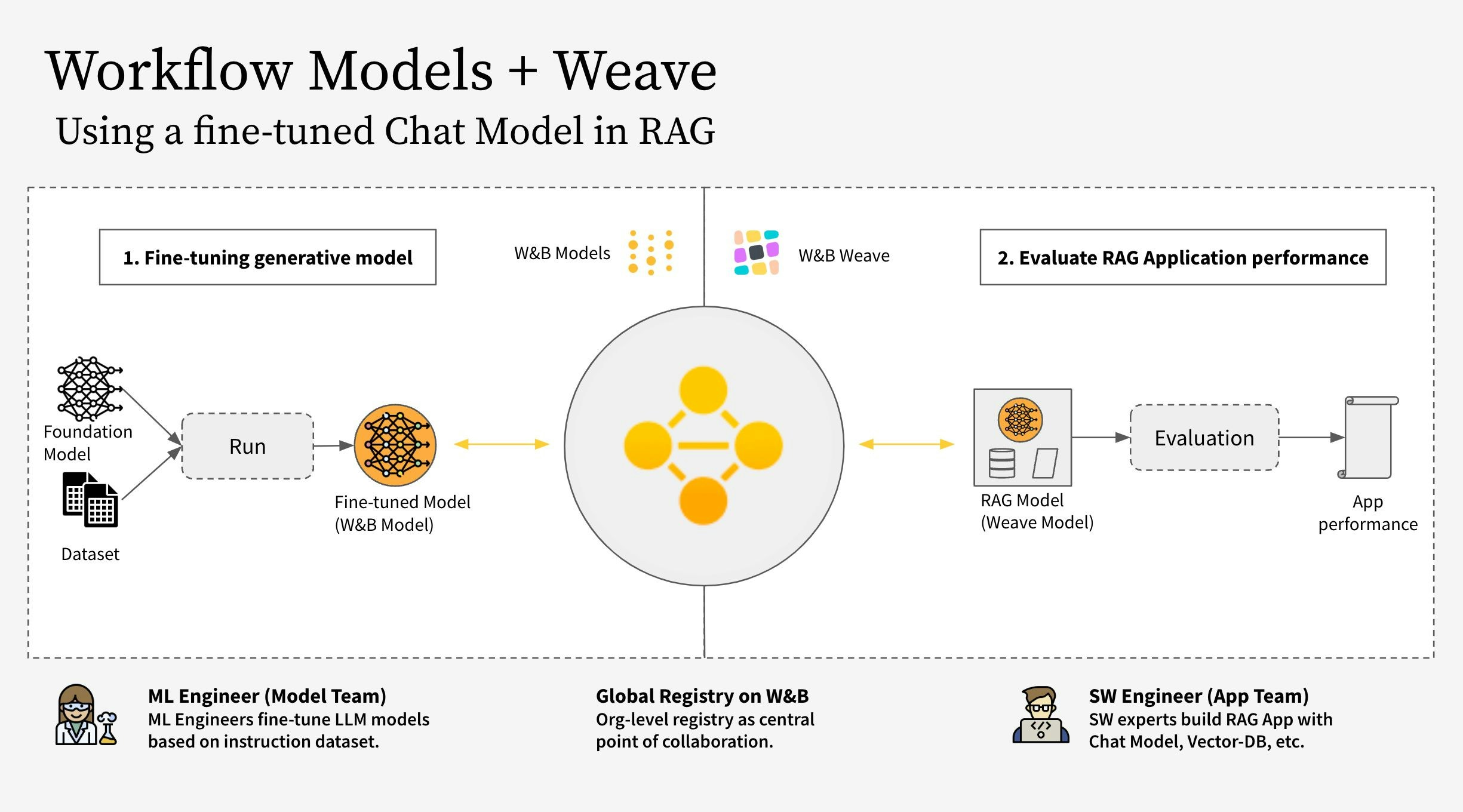 ワークフローは以下のステップで構成されています:
1. W\&B Weave を使用して RAG アプリのコードをインスツルメント(計測)する
2. LLM (Llama 3.2 など。他の LLM に置き換え可能) をファインチューニングし、 W\&B Models で追跡する
3. ファインチューニングされたモデルを [W\&B Registry](https://docs.wandb.ai/guides/core/registry) にログ記録する
4. 新しいファインチューニング済みモデルを使用して RAG アプリを実装し、 W\&B Weave でアプリを評価する
5. 結果に満足したら、更新された RAG アプリへの参照を W\&B Registry に保存する
**注意:**
以下で参照されている `RagModel` は、完全な RAG アプリと見なすことができるトップレベルの `weave.Model` です。これには `ChatModel` 、ベクトルデータベース、およびプロンプトが含まれています。 `ChatModel` も別の `weave.Model` であり、 W\&B Registry から Artifact をダウンロードするコードを含んでおり、 `RagModel` の一部として他の任意のチャットモデルをサポートするように変更できます。詳細については、 [Weave上の完全なモデル](https://wandb.ai/wandb-smle/weave-cookboook-demo/weave/evaluations?peekPath=%2Fwandb-smle%2Fweave-cookboook-demo%2Fobjects%2FRagModel%2Fversions%2Fx7MzcgHDrGXYHHDQ9BA8N89qDwcGkdSdpxH30ubm8ZM%3F%26) を参照してください。
## 1. セットアップ
まず、 `weave` と `wandb` をインストールし、 APIキーでログインします。 APIキーは [User Settings](https://wandb.ai/settings) で作成および確認できます。
```bash theme={null}
pip install weave wandb
```
```python theme={null}
import wandb
import weave
import pandas as pd
PROJECT = "weave-cookboook-demo"
ENTITY = "wandb-smle"
wandb.login()
weave.init(ENTITY + "/" + PROJECT)
```
## 2. Artifact に基づく `ChatModel` の作成
Registry からファインチューニングされたチャットモデルを取得し、それから `weave.Model` を作成して、次のステップで [`RagModel`](https://wandb.ai/wandb-smle/weave-cookboook-demo/weave/object-versions?filter=%7B%22objectName%22%3A%22RagModel%22%7D\&peekPath=%2Fwandb-smle%2Fweave-cookboook-demo%2Fobjects%2FRagModel%2Fversions%2FcqRaGKcxutBWXyM0fCGTR1Yk2mISLsNari4wlGTwERo%3F%26) に直接プラグインできるようにします。これは既存の [ChatModel](https://wandb.ai/wandb-smle/weave-cookboook-demo/weave/object-versions?filter=%7B%22objectName%22%3A%22RagModel%22%7D\&peekPath=%2Fwandb-smle%2Fweave-rag-experiments%2Fobjects%2FChatModelRag%2Fversions%2F2mhdPb667uoFlXStXtZ0MuYoxPaiAXj3KyLS1kYRi84%3F%26) と同じパラメータを受け取りますが、 `init` と `predict` のみが異なります。
```bash theme={null}
pip install unsloth
pip uninstall unsloth -y && pip install --upgrade --no-cache-dir "unsloth[colab-new] @ git+https://github.com/unslothai/unsloth.git"
```
モデルチームは、高速化のために `unsloth` ライブラリを使用してさまざまな Llama-3.2 モデルをファインチューニングしました。そのため、 Registry からダウンロードしたモデルをロードするには、アダプターを備えた特別な `unsloth.FastLanguageModel` または `peft.AutoPeftModelForCausalLM` モデルを使用します。 Registry の "Use" タブからロード用コードをコピーし、 `model_post_init` に貼り付けてください。
```python theme={null}
import weave
from pydantic import PrivateAttr
from typing import Any, List, Dict, Optional
from unsloth import FastLanguageModel
import torch
class UnslothLoRAChatModel(weave.Model):
"""
モデル名だけでなく、より多くのパラメータを保存・バージョン管理するための追加の ChatModel クラスを定義します。
これにより、特定のパラメータでのファインチューニングが可能になります。
"""
chat_model: str
cm_temperature: float
cm_max_new_tokens: int
cm_quantize: bool
inference_batch_size: int
dtype: Any
device: str
_model: Any = PrivateAttr()
_tokenizer: Any = PrivateAttr()
def model_post_init(self, __context):
run = wandb.init(project=PROJECT, job_type="model_download")
artifact_ref = self.chat_model.replace("wandb-artifact://", "")
artifact = run.use_artifact(artifact_ref)
model_path = artifact.download()
# unsloth バージョン (ネイティブで2倍速い推論を有効化)
self._model, self._tokenizer = FastLanguageModel.from_pretrained(
model_name=model_path,
max_seq_length=self.cm_max_new_tokens,
dtype=self.dtype,
load_in_4bit=self.cm_quantize,
)
FastLanguageModel.for_inference(self._model)
@weave.op()
async def predict(self, query: List[str]) -> dict:
# add_generation_prompt = true - 生成には必須
input_ids = self._tokenizer.apply_chat_template(
query,
tokenize=True,
add_generation_prompt=True,
return_tensors="pt",
).to("cuda")
output_ids = self._model.generate(
input_ids=input_ids,
max_new_tokens=64,
use_cache=True,
temperature=1.5,
min_p=0.1,
)
decoded_outputs = self._tokenizer.batch_decode(
output_ids[0][input_ids.shape[1] :], skip_special_tokens=True
)
return "".join(decoded_outputs).strip()
```
次に、 Registry からの特定のリンクを使用して新しいモデルを作成します:
```python theme={null}
ORG_ENTITY = "wandb32" # 組織名に置き換えてください
artifact_name = "Finetuned Llama-3.2" # artifact名に置き換えてください
MODEL_REG_URL = f"wandb-artifact://{ORG_ENTITY}/wandb-registry-RAG Chat Models/{artifact_name}:v3"
max_seq_length = 2048
dtype = None
load_in_4bit = True
new_chat_model = UnslothLoRAChatModel(
name="UnslothLoRAChatModelRag",
chat_model=MODEL_REG_URL,
cm_temperature=1.0,
cm_max_new_tokens=max_seq_length,
cm_quantize=load_in_4bit,
inference_batch_size=max_seq_length,
dtype=dtype,
device="auto",
)
```
最後に、非同期で評価を実行します:
```python theme={null}
await new_chat_model.predict(
[{"role": "user", "content": "ドイツの首都はどこですか?"}]
)
```
## 3. 新しい `ChatModel` バージョンを `RagModel` に統合する
ファインチューニングされたチャットモデルから RAG アプリを構築すると、特に対話型 AI システムのパフォーマンスと汎用性を高める上で、いくつかの利点が得られます。
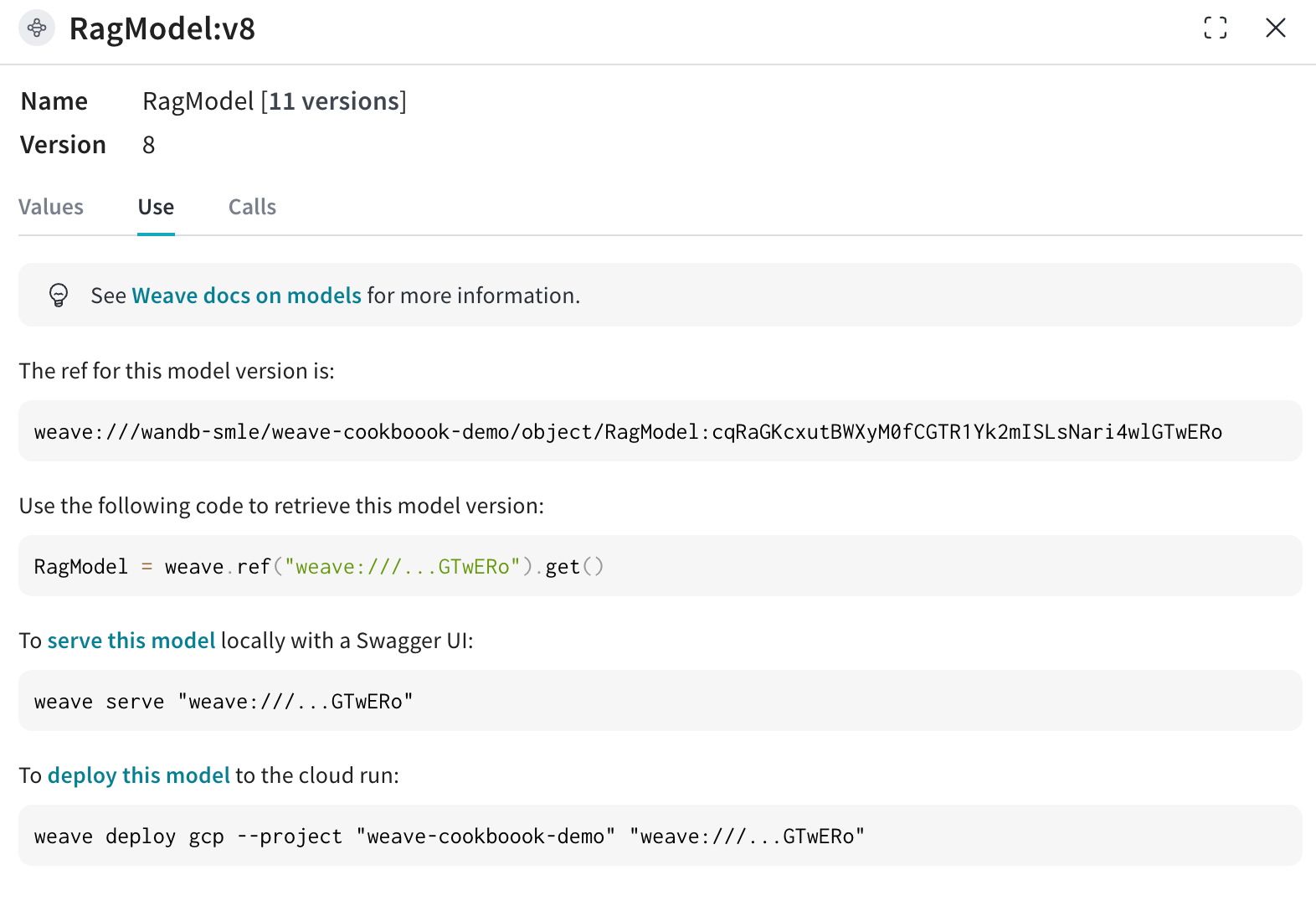
既存の Weave プロジェクトから [`RagModel`](https://wandb.ai/wandb-smle/weave-cookboook-demo/weave/object-versions?filter=%7B%22objectName%22%3A%22RagModel%22%7D\&peekPath=%2Fwandb-smle%2Fweave-cookboook-demo%2Fobjects%2FRagModel%2Fversions%2FcqRaGKcxutBWXyM0fCGTR1Yk2mISLsNari4wlGTwERo%3F%26) を取得し(下図のように "Use" タブから現在の `RagModel` の weave 参照を取得できます)、 `ChatModel` を新しいものに入れ替えます。他のコンポーネント(ベクトル DB、プロンプトなど)を変更したり再作成したりする必要はありません。
ワークフローは以下のステップで構成されています:
1. W\&B Weave を使用して RAG アプリのコードをインスツルメント(計測)する
2. LLM (Llama 3.2 など。他の LLM に置き換え可能) をファインチューニングし、 W\&B Models で追跡する
3. ファインチューニングされたモデルを [W\&B Registry](https://docs.wandb.ai/guides/core/registry) にログ記録する
4. 新しいファインチューニング済みモデルを使用して RAG アプリを実装し、 W\&B Weave でアプリを評価する
5. 結果に満足したら、更新された RAG アプリへの参照を W\&B Registry に保存する
**注意:**
以下で参照されている `RagModel` は、完全な RAG アプリと見なすことができるトップレベルの `weave.Model` です。これには `ChatModel` 、ベクトルデータベース、およびプロンプトが含まれています。 `ChatModel` も別の `weave.Model` であり、 W\&B Registry から Artifact をダウンロードするコードを含んでおり、 `RagModel` の一部として他の任意のチャットモデルをサポートするように変更できます。詳細については、 [Weave上の完全なモデル](https://wandb.ai/wandb-smle/weave-cookboook-demo/weave/evaluations?peekPath=%2Fwandb-smle%2Fweave-cookboook-demo%2Fobjects%2FRagModel%2Fversions%2Fx7MzcgHDrGXYHHDQ9BA8N89qDwcGkdSdpxH30ubm8ZM%3F%26) を参照してください。
## 1. セットアップ
まず、 `weave` と `wandb` をインストールし、 APIキーでログインします。 APIキーは [User Settings](https://wandb.ai/settings) で作成および確認できます。
```bash theme={null}
pip install weave wandb
```
```python theme={null}
import wandb
import weave
import pandas as pd
PROJECT = "weave-cookboook-demo"
ENTITY = "wandb-smle"
wandb.login()
weave.init(ENTITY + "/" + PROJECT)
```
## 2. Artifact に基づく `ChatModel` の作成
Registry からファインチューニングされたチャットモデルを取得し、それから `weave.Model` を作成して、次のステップで [`RagModel`](https://wandb.ai/wandb-smle/weave-cookboook-demo/weave/object-versions?filter=%7B%22objectName%22%3A%22RagModel%22%7D\&peekPath=%2Fwandb-smle%2Fweave-cookboook-demo%2Fobjects%2FRagModel%2Fversions%2FcqRaGKcxutBWXyM0fCGTR1Yk2mISLsNari4wlGTwERo%3F%26) に直接プラグインできるようにします。これは既存の [ChatModel](https://wandb.ai/wandb-smle/weave-cookboook-demo/weave/object-versions?filter=%7B%22objectName%22%3A%22RagModel%22%7D\&peekPath=%2Fwandb-smle%2Fweave-rag-experiments%2Fobjects%2FChatModelRag%2Fversions%2F2mhdPb667uoFlXStXtZ0MuYoxPaiAXj3KyLS1kYRi84%3F%26) と同じパラメータを受け取りますが、 `init` と `predict` のみが異なります。
```bash theme={null}
pip install unsloth
pip uninstall unsloth -y && pip install --upgrade --no-cache-dir "unsloth[colab-new] @ git+https://github.com/unslothai/unsloth.git"
```
モデルチームは、高速化のために `unsloth` ライブラリを使用してさまざまな Llama-3.2 モデルをファインチューニングしました。そのため、 Registry からダウンロードしたモデルをロードするには、アダプターを備えた特別な `unsloth.FastLanguageModel` または `peft.AutoPeftModelForCausalLM` モデルを使用します。 Registry の "Use" タブからロード用コードをコピーし、 `model_post_init` に貼り付けてください。
```python theme={null}
import weave
from pydantic import PrivateAttr
from typing import Any, List, Dict, Optional
from unsloth import FastLanguageModel
import torch
class UnslothLoRAChatModel(weave.Model):
"""
モデル名だけでなく、より多くのパラメータを保存・バージョン管理するための追加の ChatModel クラスを定義します。
これにより、特定のパラメータでのファインチューニングが可能になります。
"""
chat_model: str
cm_temperature: float
cm_max_new_tokens: int
cm_quantize: bool
inference_batch_size: int
dtype: Any
device: str
_model: Any = PrivateAttr()
_tokenizer: Any = PrivateAttr()
def model_post_init(self, __context):
run = wandb.init(project=PROJECT, job_type="model_download")
artifact_ref = self.chat_model.replace("wandb-artifact://", "")
artifact = run.use_artifact(artifact_ref)
model_path = artifact.download()
# unsloth バージョン (ネイティブで2倍速い推論を有効化)
self._model, self._tokenizer = FastLanguageModel.from_pretrained(
model_name=model_path,
max_seq_length=self.cm_max_new_tokens,
dtype=self.dtype,
load_in_4bit=self.cm_quantize,
)
FastLanguageModel.for_inference(self._model)
@weave.op()
async def predict(self, query: List[str]) -> dict:
# add_generation_prompt = true - 生成には必須
input_ids = self._tokenizer.apply_chat_template(
query,
tokenize=True,
add_generation_prompt=True,
return_tensors="pt",
).to("cuda")
output_ids = self._model.generate(
input_ids=input_ids,
max_new_tokens=64,
use_cache=True,
temperature=1.5,
min_p=0.1,
)
decoded_outputs = self._tokenizer.batch_decode(
output_ids[0][input_ids.shape[1] :], skip_special_tokens=True
)
return "".join(decoded_outputs).strip()
```
次に、 Registry からの特定のリンクを使用して新しいモデルを作成します:
```python theme={null}
ORG_ENTITY = "wandb32" # 組織名に置き換えてください
artifact_name = "Finetuned Llama-3.2" # artifact名に置き換えてください
MODEL_REG_URL = f"wandb-artifact://{ORG_ENTITY}/wandb-registry-RAG Chat Models/{artifact_name}:v3"
max_seq_length = 2048
dtype = None
load_in_4bit = True
new_chat_model = UnslothLoRAChatModel(
name="UnslothLoRAChatModelRag",
chat_model=MODEL_REG_URL,
cm_temperature=1.0,
cm_max_new_tokens=max_seq_length,
cm_quantize=load_in_4bit,
inference_batch_size=max_seq_length,
dtype=dtype,
device="auto",
)
```
最後に、非同期で評価を実行します:
```python theme={null}
await new_chat_model.predict(
[{"role": "user", "content": "ドイツの首都はどこですか?"}]
)
```
## 3. 新しい `ChatModel` バージョンを `RagModel` に統合する
ファインチューニングされたチャットモデルから RAG アプリを構築すると、特に対話型 AI システムのパフォーマンスと汎用性を高める上で、いくつかの利点が得られます。
既存の Weave プロジェクトから [`RagModel`](https://wandb.ai/wandb-smle/weave-cookboook-demo/weave/object-versions?filter=%7B%22objectName%22%3A%22RagModel%22%7D\&peekPath=%2Fwandb-smle%2Fweave-cookboook-demo%2Fobjects%2FRagModel%2Fversions%2FcqRaGKcxutBWXyM0fCGTR1Yk2mISLsNari4wlGTwERo%3F%26) を取得し(下図のように "Use" タブから現在の `RagModel` の weave 参照を取得できます)、 `ChatModel` を新しいものに入れ替えます。他のコンポーネント(ベクトル DB、プロンプトなど)を変更したり再作成したりする必要はありません。
 ```bash theme={null}
pip install litellm faiss-gpu
```
```python theme={null}
RagModel = weave.ref(
"weave://wandb-smle/weave-cookboook-demo/object/RagModel:cqRaGKcxutBWXyM0fCGTR1Yk2mISLsNari4wlGTwERo"
).get()
# マジック:chat_model を入れ替えて新しいバージョンを publish する(他の RAG コンポーネントを気にする必要はありません)
RagModel.chat_model = new_chat_model
# 予測中に参照されるように、まず新しいバージョンを publish します
PUB_REFERENCE = weave.publish(RagModel, "RagModel")
await RagModel.predict("最初の気候変動に関する会議はいつ開催されましたか?")
```
## 4. 既存のモデルの run に接続して新しい `weave.Evaluation` を実行する
最後に、既存の `weave.Evaluation` 上で新しい `RagModel` を評価します。統合をできるだけ簡単にするために、以下の変更を加えます。
Models の観点から:
* Registry からモデルを取得すると、チャットモデルのエンドツーエンドの Lineage の一部である新しい `run` オブジェクトが作成されます。
* run の設定に Trace ID(現在の評価 ID を含む)を追加し、モデルチームがリンクをクリックして対応する Weave ページに移動できるようにします。
Weave の観点から:
* Artifact / Registry のリンクを `ChatModel` (つまり `RagModel` )への入力として保存します。
* `weave.attributes` を使用して、 run.id を トレース の追加カラムとして保存します。
```python theme={null}
# マジック:評価データセットとスコアラーを持つ評価を取得して使用する
WEAVE_EVAL = "weave://wandb-smle/weave-cookboook-demo/object/climate_rag_eval:ntRX6qn3Tx6w3UEVZXdhIh1BWGh7uXcQpOQnIuvnSgo"
climate_rag_eval = weave.ref(WEAVE_EVAL).get()
run = wandb.init()
with weave.attributes({"wandb-run-id": run.id}):
# 評価トレースを Models に保存するために、 .call 属性を使用して結果とコールの両方を取得します
summary, call = await climate_rag_eval.evaluate.call(climate_rag_eval, ` RagModel `)
```
## 5. 新しい RAG モデルを Registry に保存する
新しい RAG モデルを効果的に共有するために、 weave バージョンをエイリアスとして追加し、参照 Artifact として Registry にプッシュします。
```python theme={null}
MODELS_OBJECT_VERSION = PUB_REFERENCE.digest # weave オブジェクトのバージョン
MODELS_OBJECT_NAME = PUB_REFERENCE.name # weave オブジェクト名
models_url = f"https://wandb.ai/{ENTITY}/{PROJECT}/weave/objects/{MODELS_OBJECT_NAME}/versions/{MODELS_OBJECT_VERSION}"
models_link = (
f"weave://{ENTITY}/{PROJECT}/object/{MODELS_OBJECT_NAME}:{MODELS_OBJECT_VERSION}"
)
with wandb.init(project=PROJECT, entity=ENTITY) as run:
# 新しい Artifact を作成
artifact_model = wandb.Artifact(
name="RagModel",
type="model",
description="Weave の RagModel からの Models リンク",
metadata={"url": models_url},
)
artifact_model.add_reference(models_link, name="model", checksum=False)
# 新しい artifact をログ記録
run.log_artifact(artifact_model, aliases=[MODELS_OBJECT_VERSION])
# registry へのリンク
run.link_artifact(
artifact_model, target_path="wandb32/wandb-registry-RAG Models/RAG Model"
)
```
```bash theme={null}
pip install litellm faiss-gpu
```
```python theme={null}
RagModel = weave.ref(
"weave://wandb-smle/weave-cookboook-demo/object/RagModel:cqRaGKcxutBWXyM0fCGTR1Yk2mISLsNari4wlGTwERo"
).get()
# マジック:chat_model を入れ替えて新しいバージョンを publish する(他の RAG コンポーネントを気にする必要はありません)
RagModel.chat_model = new_chat_model
# 予測中に参照されるように、まず新しいバージョンを publish します
PUB_REFERENCE = weave.publish(RagModel, "RagModel")
await RagModel.predict("最初の気候変動に関する会議はいつ開催されましたか?")
```
## 4. 既存のモデルの run に接続して新しい `weave.Evaluation` を実行する
最後に、既存の `weave.Evaluation` 上で新しい `RagModel` を評価します。統合をできるだけ簡単にするために、以下の変更を加えます。
Models の観点から:
* Registry からモデルを取得すると、チャットモデルのエンドツーエンドの Lineage の一部である新しい `run` オブジェクトが作成されます。
* run の設定に Trace ID(現在の評価 ID を含む)を追加し、モデルチームがリンクをクリックして対応する Weave ページに移動できるようにします。
Weave の観点から:
* Artifact / Registry のリンクを `ChatModel` (つまり `RagModel` )への入力として保存します。
* `weave.attributes` を使用して、 run.id を トレース の追加カラムとして保存します。
```python theme={null}
# マジック:評価データセットとスコアラーを持つ評価を取得して使用する
WEAVE_EVAL = "weave://wandb-smle/weave-cookboook-demo/object/climate_rag_eval:ntRX6qn3Tx6w3UEVZXdhIh1BWGh7uXcQpOQnIuvnSgo"
climate_rag_eval = weave.ref(WEAVE_EVAL).get()
run = wandb.init()
with weave.attributes({"wandb-run-id": run.id}):
# 評価トレースを Models に保存するために、 .call 属性を使用して結果とコールの両方を取得します
summary, call = await climate_rag_eval.evaluate.call(climate_rag_eval, ` RagModel `)
```
## 5. 新しい RAG モデルを Registry に保存する
新しい RAG モデルを効果的に共有するために、 weave バージョンをエイリアスとして追加し、参照 Artifact として Registry にプッシュします。
```python theme={null}
MODELS_OBJECT_VERSION = PUB_REFERENCE.digest # weave オブジェクトのバージョン
MODELS_OBJECT_NAME = PUB_REFERENCE.name # weave オブジェクト名
models_url = f"https://wandb.ai/{ENTITY}/{PROJECT}/weave/objects/{MODELS_OBJECT_NAME}/versions/{MODELS_OBJECT_VERSION}"
models_link = (
f"weave://{ENTITY}/{PROJECT}/object/{MODELS_OBJECT_NAME}:{MODELS_OBJECT_VERSION}"
)
with wandb.init(project=PROJECT, entity=ENTITY) as run:
# 新しい Artifact を作成
artifact_model = wandb.Artifact(
name="RagModel",
type="model",
description="Weave の RagModel からの Models リンク",
metadata={"url": models_url},
)
artifact_model.add_reference(models_link, name="model", checksum=False)
# 新しい artifact をログ記録
run.log_artifact(artifact_model, aliases=[MODELS_OBJECT_VERSION])
# registry へのリンク
run.link_artifact(
artifact_model, target_path="wandb32/wandb-registry-RAG Models/RAG Model"
)
```