> ## Documentation Index
> Fetch the complete documentation index at: https://wb-21fd5541-serverless-sft-revamp.mintlify.site/llms.txt
> Use this file to discover all available pages before exploring further.
# 評価 パイプライン の構築
> thoughtful mini-thought Annex Weave Models と Evaluations を使用して評価 パイプライン を構築する方法について学びます
export const GitHubLink = ({url}) =>
GitHub source
;
export const ColabLink = ({url}) =>
Try in Colab
;
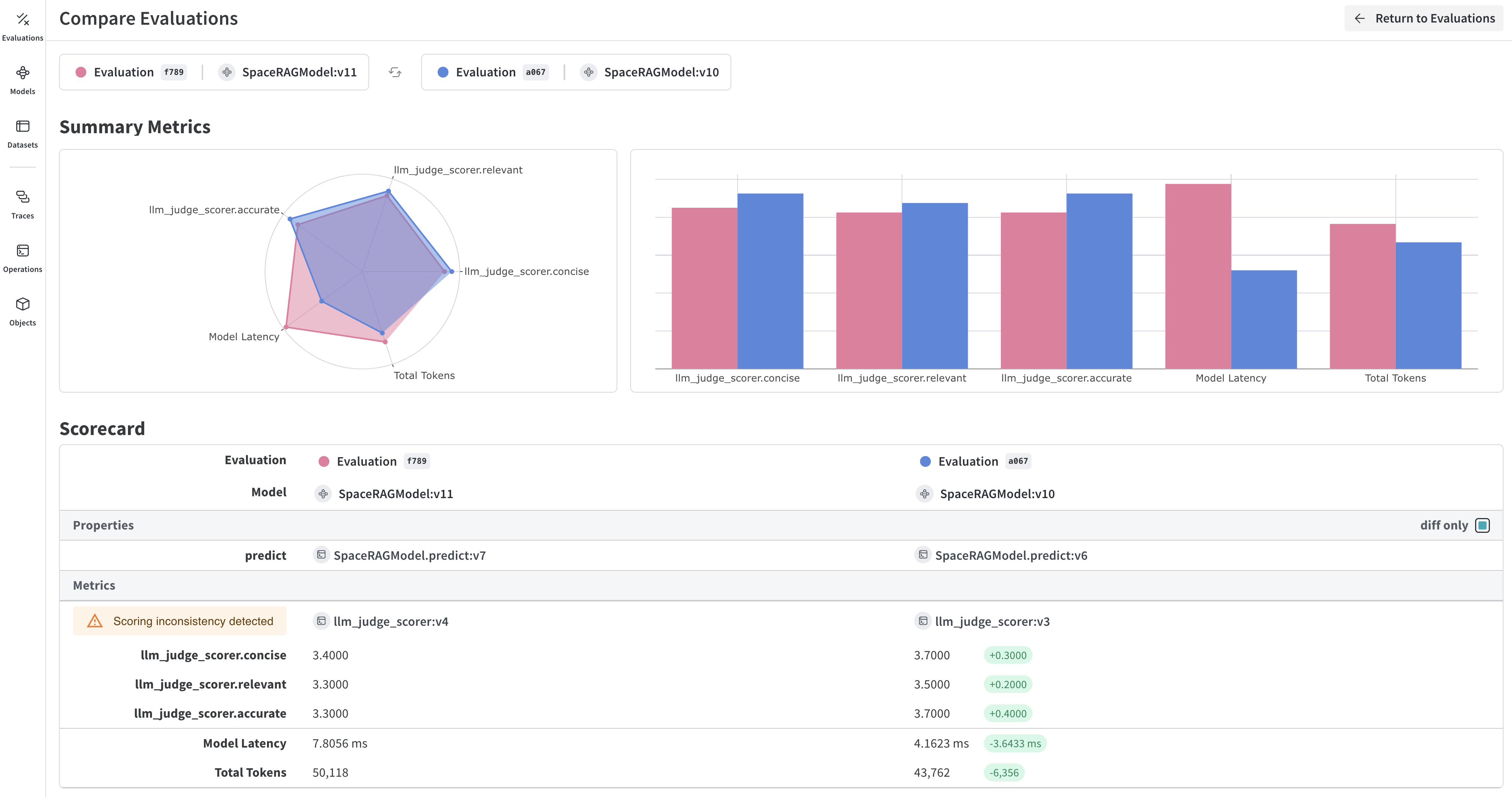
Evaluations (評価)は、アプリケーションに変更を加えた後、一連の例題に対してテストを行うことで、反復的な改善を可能にします。 Weave は、 [`Model`](/weave/guides/core-types/models) クラスと [`Evaluation`](/weave/guides/core-types/evaluations) クラスを使用して、評価のトラッキングを第一級の機能としてサポートしています。これらの API は最小限の前提で設計されており、幅広いユースケースに対して柔軟に対応できます。
 ## 学習内容:
このガイドでは、以下の方法について説明します。
* `Model` のセットアップ
* LLM の応答をテストするためのデータセットの作成
* モデルの出力と期待される出力を比較するためのスコアリング関数の定義
* スコアリング関数と組み込みのスコアラーを使用して、モデルをデータセットに対してテストする評価の実行
* Weave UI での評価結果の確認
## Prerequisites
* A [W\&B account](https://wandb.ai/signup)
* Python 3.8+ or Node.js 18+
* Required packages installed:
* **Python**: `pip install weave openai`
* **TypeScript**: `npm install weave openai`
* An [OpenAI API key](https://platform.openai.com/api-keys) set as an environment variable
## 必要なライブラリと関数のインポート
スクリプトに以下のライブラリをインポートします。
```python lines theme={null}
import json
import openai
import asyncio
import weave
from weave.scorers import MultiTaskBinaryClassificationF1
```
```typescript lines theme={null}
import * as weave from 'weave';
import OpenAI from 'openai';
```
## `Model` の構築
Weave において、 [`Models` はオブジェクト](/weave/guides/core-types/models) であり、モデルやエージェントの振る舞い(ロジック、プロンプト、パラメータ)と、バージョン管理されたメタデータ(パラメータ、コード、マイクロ設定)の両方をキャプチャします。これにより、信頼性の高いトラッキング、比較、評価、および反復が可能になります。
`Model` をインスタンス化すると、 Weave は自動的にその設定と振る舞いをキャプチャし、変更があった場合にはバージョンを更新します。これにより、反復作業を進めながら、時間の経過に伴うパフォーマンスの推移を追跡できます。
`Model` は、 `Model` クラスを継承し、1つの例を受け取って応答を返す `predict` 関数の定義を実装することで宣言されます。
以下の例のモデルは、 OpenAI を使用して、送信された文章からエイリアンのフルーツの名前、色、味を抽出します。
```python lines {1,5} theme={null}
class ExtractFruitsModel(weave.Model):
model_name: str
prompt_template: str
@weave.op()
async def predict(self, sentence: str) -> dict:
client = openai.AsyncClient()
response = await client.chat.completions.create(
model=self.model_name,
messages=[
{"role": "user", "content": self.prompt_template.format(sentence=sentence)}
],
)
result = response.choices[0].message.content
if result is None:
raise ValueError("No response from model")
parsed = json.loads(result)
return parsed
```
```typescript lines {9} theme={null}
// 注意: weave.Model はまだ TypeScript でサポートされていません。
// 代わりに、モデルのような関数を weave.op でラップしてください。
import * as weave from 'weave';
import OpenAI from 'openai';
const openaiClient = new OpenAI();
const model = weave.op(async function myModel({datasetRow}) {
const prompt = `Extract fields ("fruit": , "color": , "flavor") from the following text, as json: ${datasetRow.sentence}`;
const response = await openaiClient.chat.completions.create({
model: 'gpt-3.5-turbo',
messages: [{ role: 'user', content: prompt }],
response_format: { type: 'json_object' }
});
return JSON.parse(response.choices[0].message.content);
});
```
`ExtractFruitsModel` クラスは `weave.Model` を継承(サブクラス化)しているため、 Weave はインスタンス化されたオブジェクトを追跡できます。 `@weave.op` は predict 関数をデコレートし、その入力と出力を記録します。
次のように `Model` オブジェクトをインスタンス化できます。
```python lines theme={null}
# チーム名とプロジェクト名を設定します
weave.init('/eval_pipeline_quickstart')
model = ExtractFruitsModel(
model_name='gpt-3.5-turbo-1106',
prompt_template='Extract fields ("fruit": , "color": , "flavor": ) from the following text, as json: {sentence}'
)
sentence = "There are many fruits that were found on the recently discovered planet Goocrux. There are neoskizzles that grow there, which are purple and taste like candy."
print(asyncio.run(model.predict(sentence)))
# Jupyter Notebook の場合は、以下を実行してください:
# await model.predict(sentence)
```
```typescript theme={null}
await weave.init('eval_pipeline_quickstart');
const sentence = "There are many fruits that were found on the recently discovered planet Goocrux. There are neoskizzles that grow there, which are purple and taste like candy.";
const result = await model({ datasetRow: { sentence } });
console.log(result);
```
## データセットの作成
次に、モデルを評価するためのデータセットが必要です。 [`Dataset` は、 Weave オブジェクトとして保存された例題のコレクション](/weave/guides/core-types/datasets) です。
以下の例のデータセットでは、3つの入力文の例とそれに対する正解( `labels` )を定義し、スコアリング関数が読み取れるように JSON テーブル形式でフォーマットします。
この例ではコード内で例題のリストを作成していますが、実行中のアプリケーションから1つずつログを記録することも可能です。
```python lines theme={null}
sentences = ["There are many fruits that were found on the recently discovered planet Goocrux. There are neoskizzles that grow there, which are purple and taste like candy.",
"Pounits are a bright green color and are more savory than sweet.",
"Finally, there are fruits called glowls, which have a very sour and bitter taste which is acidic and caustic, and a pale orange tinge to them."]
labels = [
{'fruit': 'neoskizzles', 'color': 'purple', 'flavor': 'candy'},
{'fruit': 'pounits', 'color': 'bright green', 'flavor': 'savory'},
{'fruit': 'glowls', 'color': 'pale orange', 'flavor': 'sour and bitter'}
]
examples = [
{'id': '0', 'sentence': sentences[0], 'target': labels[0]},
{'id': '1', 'sentence': sentences[1], 'target': labels[1]},
{'id': '2', 'sentence': sentences[2], 'target': labels[2]}
]
```
```typescript theme={null}
const sentences = [
"There are many fruits that were found on the recently discovered planet Goocrux. There are neoskizzles that grow there, which are purple and taste like candy.",
"Pounits are a bright green color and are more savory than sweet.",
"Finally, there are fruits called glowls, which have a very sour and bitter taste which is acidic and caustic, and a pale orange tinge to them."
];
const labels = [
{ fruit: 'neoskizzles', color: 'purple', flavor: 'candy' },
{ fruit: 'pounits', color: 'bright green', flavor: 'savory' },
{ fruit: 'glowls', color: 'pale orange', flavor: 'sour and bitter' }
];
const examples = sentences.map((sentence, i) => ({
id: i.toString(),
sentence,
target: labels[i]
}));
```
次に、 `weave.Dataset()` クラスを使用してデータセットを作成し、パブリッシュします。
```python lines {2} theme={null}
weave.init('eval_pipeline_quickstart')
dataset = weave.Dataset(name='fruits', rows=examples)
weave.publish(dataset)
```
```typescript lines {3-6} theme={null}
import * as weave from 'weave';
await weave.init('eval_pipeline_quickstart');
const dataset = new weave.Dataset({
name: 'fruits',
rows: examples
});
await dataset.save();
```
## カスタムスコアリング関数の定義
Weave の評価を使用する場合、 Weave は `output` と比較するための `target` を想定します。以下のスコアリング関数は、2つの辞書( `target` と `output` )を受け取り、出力がターゲットと一致するかどうかを示すブール値の辞書を返します。 `@weave.op()` デコレータにより、 Weave はスコアリング関数の実行を追跡できるようになります。
```python lines theme={null}
@weave.op()
def fruit_name_score(target: dict, output: dict) -> dict:
return {'correct': target['fruit'] == output['fruit']}
```
```typescript theme={null}
import * as weave from 'weave';
const fruitNameScorer = weave.op(
function fruitNameScore({target, output}) {
return { correct: target.fruit === output.fruit };
}
);
```
独自のスコアリング関数を作成する方法については、 [Scorers](/weave/guides/evaluation/scorers) ガイドで詳細を確認してください。
アプリケーションによっては、カスタムの `Scorer` クラスを作成したい場合があるでしょう。例えば、特定のパラメータ(チャットモデルやプロンプトなど)、特定の行のスコアリング、および集計スコアの計算を備えた標準化された `LLMJudge` クラスを作成できます。詳細については、次章の [RAG アプリケーションのモデルベース評価](/weave/tutorial-rag#optional-defining-a-scorer-class) にある Scorer クラスの定義に関するチュートリアルを参照してください。
## 組み込みスコアラーの使用と評価の実行
カスタムスコアリング関数に加えて、 [Weave の組み込みスコアラー](/weave/guides/evaluation/builtin_scorers) も使用できます。以下の評価では、 `weave.Evaluation()` は前のセクションで定義した `fruit_name_score` 関数と、 [F1 スコア](https://en.wikipedia.org/wiki/F-score) を計算する組み込みの `MultiTaskBinaryClassificationF1` スコアラーを使用します。
以下の例では、2つのスコアリング関数を使用して `fruits` データセットに対して `ExtractFruitsModel` の評価を実行し、その結果を Weave に記録します。
```python lines {3-10} theme={null}
weave.init('eval_pipeline_quickstart')
evaluation = weave.Evaluation(
name='fruit_eval',
dataset=dataset,
scorers=[
MultiTaskBinaryClassificationF1(class_names=["fruit", "color", "flavor"]),
fruit_name_score
],
)
print(asyncio.run(evaluation.evaluate(model)))
# Jupyter Notebook の場合は、以下を実行してください:
# await evaluation.evaluate(model)
```
```typescript lines {5-9} theme={null}
import * as weave from 'weave';
await weave.init('eval_pipeline_quickstart');
const evaluation = new weave.Evaluation({
name: 'fruit_eval',
dataset: dataset,
scorers: [fruitNameScorer],
});
const results = await evaluation.evaluate(model);
console.log(results);
```
Python スクリプトから実行する場合は、 `asyncio.run` を使用する必要があります。ただし、 Jupyter Notebook から実行する場合は、直接 `await` を使用できます。
### 完全な例
```python lines theme={null}
import json
import asyncio
import openai
import weave
from weave.scorers import MultiTaskBinaryClassificationF1
# Weave を一度初期化します
weave.init('eval_pipeline_quickstart')
# 1. Model の定義
class ExtractFruitsModel(weave.Model):
model_name: str
prompt_template: str
@weave.op()
async def predict(self, sentence: str) -> dict:
client = openai.AsyncClient()
response = await client.chat.completions.create(
model=self.model_name,
messages=[{"role": "user", "content": self.prompt_template.format(sentence=sentence)}],
)
result = response.choices[0].message.content
if result is None:
raise ValueError("No response from model")
return json.loads(result)
# 2. モデルのインスタンス化
model = ExtractFruitsModel(
model_name='gpt-3.5-turbo-1106',
prompt_template='Extract fields ("fruit": , "color": , "flavor": ) from the following text, as json: {sentence}'
)
# 3. データセットの作成
sentences = ["There are many fruits that were found on the recently discovered planet Goocrux. There are neoskizzles that grow there, which are purple and taste like candy.",
"Pounits are a bright green color and are more savory than sweet.",
"Finally, there are fruits called glowls, which have a very sour and bitter taste which is acidic and caustic, and a pale orange tinge to them."]
labels = [
{'fruit': 'neoskizzles', 'color': 'purple', 'flavor': 'candy'},
{'fruit': 'pounits', 'color': 'bright green', 'flavor': 'savory'},
{'fruit': 'glowls', 'color': 'pale orange', 'flavor': 'sour and bitter'}
]
examples = [
{'id': '0', 'sentence': sentences[0], 'target': labels[0]},
{'id': '1', 'sentence': sentences[1], 'target': labels[1]},
{'id': '2', 'sentence': sentences[2], 'target': labels[2]}
]
dataset = weave.Dataset(name='fruits', rows=examples)
weave.publish(dataset)
# 4. スコアリング関数の定義
@weave.op()
def fruit_name_score(target: dict, output: dict) -> dict:
return {'correct': target['fruit'] == output['fruit']}
# 5. 評価の実行
evaluation = weave.Evaluation(
name='fruit_eval',
dataset=dataset,
scorers=[
MultiTaskBinaryClassificationF1(class_names=["fruit", "color", "flavor"]),
fruit_name_score
],
)
print(asyncio.run(evaluation.evaluate(model)))
```
```typescript lines theme={null}
import * as weave from 'weave';
import OpenAI from 'openai';
// Weave を一度初期化します
await weave.init('eval_pipeline_quickstart');
// 1. Model の定義
// 注意: weave.Model はまだ TypeScript でサポートされていません。
// 代わりに、モデルのような関数を weave.op でラップしてください。
const openaiClient = new OpenAI();
const model = weave.op(async function myModel({datasetRow}) {
const prompt = `Extract fields ("fruit": , "color": , "flavor": ) from the following text, as json: ${datasetRow.sentence}`;
const response = await openaiClient.chat.completions.create({
model: 'gpt-3.5-turbo',
messages: [{ role: 'user', content: prompt }],
response_format: { type: 'json_object' }
});
return JSON.parse(response.choices[0].message.content);
});
// 2. データセットの作成
const sentences = [
"There are many fruits that were found on the recently discovered planet Goocrux. There are neoskizzles that grow there, which are purple and taste like candy.",
"Pounits are a bright green color and are more savory than sweet.",
"Finally, there are fruits called glowls, which have a very sour and bitter taste which is acidic and caustic, and a pale orange tinge to them."
];
const labels = [
{ fruit: 'neoskizzles', color: 'purple', flavor: 'candy' },
{ fruit: 'pounits', color: 'bright green', flavor: 'savory' },
{ fruit: 'glowls', color: 'pale orange', flavor: 'sour and bitter' }
];
const examples = sentences.map((sentence, i) => ({
id: i.toString(),
sentence,
target: labels[i]
}));
const dataset = new weave.Dataset({
name: 'fruits',
rows: examples
});
await dataset.save();
// 3. スコアリング関数の定義
const fruitNameScorer = weave.op(
function fruitNameScore({target, output}) {
return { correct: target.fruit === output.fruit };
}
);
// 4. 評価の実行
const evaluation = new weave.Evaluation({
name: 'fruit_eval',
dataset: dataset,
scorers: [fruitNameScorer],
});
const results = await evaluation.evaluate(model);
console.log(results);
```
## 評価結果の確認
Weave は、各予測とスコアのトレースを自動的にキャプチャします。評価によって出力されたリンクをクリックして、 Weave UI で結果を確認してください。
## Weave 評価の詳細
* スコアラーの [構築と使用方法](/weave/guides/evaluation/scorers) についての詳細。
* Weave の [組み込みスコアリング関数](/weave/guides/evaluation/builtin_scorers) の確認。
* LLM を評価者として使用する [モデルベース評価](/weave/guides/evaluation/scorers#model-based-evaluation) について。
## 次のステップ
[RAG アプリケーションの構築](/weave/tutorial-rag) を通じて、検索拡張生成(Retrieval-Augmented Generation)の評価について学びましょう。
## 学習内容:
このガイドでは、以下の方法について説明します。
* `Model` のセットアップ
* LLM の応答をテストするためのデータセットの作成
* モデルの出力と期待される出力を比較するためのスコアリング関数の定義
* スコアリング関数と組み込みのスコアラーを使用して、モデルをデータセットに対してテストする評価の実行
* Weave UI での評価結果の確認
## Prerequisites
* A [W\&B account](https://wandb.ai/signup)
* Python 3.8+ or Node.js 18+
* Required packages installed:
* **Python**: `pip install weave openai`
* **TypeScript**: `npm install weave openai`
* An [OpenAI API key](https://platform.openai.com/api-keys) set as an environment variable
## 必要なライブラリと関数のインポート
スクリプトに以下のライブラリをインポートします。
```python lines theme={null}
import json
import openai
import asyncio
import weave
from weave.scorers import MultiTaskBinaryClassificationF1
```
```typescript lines theme={null}
import * as weave from 'weave';
import OpenAI from 'openai';
```
## `Model` の構築
Weave において、 [`Models` はオブジェクト](/weave/guides/core-types/models) であり、モデルやエージェントの振る舞い(ロジック、プロンプト、パラメータ)と、バージョン管理されたメタデータ(パラメータ、コード、マイクロ設定)の両方をキャプチャします。これにより、信頼性の高いトラッキング、比較、評価、および反復が可能になります。
`Model` をインスタンス化すると、 Weave は自動的にその設定と振る舞いをキャプチャし、変更があった場合にはバージョンを更新します。これにより、反復作業を進めながら、時間の経過に伴うパフォーマンスの推移を追跡できます。
`Model` は、 `Model` クラスを継承し、1つの例を受け取って応答を返す `predict` 関数の定義を実装することで宣言されます。
以下の例のモデルは、 OpenAI を使用して、送信された文章からエイリアンのフルーツの名前、色、味を抽出します。
```python lines {1,5} theme={null}
class ExtractFruitsModel(weave.Model):
model_name: str
prompt_template: str
@weave.op()
async def predict(self, sentence: str) -> dict:
client = openai.AsyncClient()
response = await client.chat.completions.create(
model=self.model_name,
messages=[
{"role": "user", "content": self.prompt_template.format(sentence=sentence)}
],
)
result = response.choices[0].message.content
if result is None:
raise ValueError("No response from model")
parsed = json.loads(result)
return parsed
```
```typescript lines {9} theme={null}
// 注意: weave.Model はまだ TypeScript でサポートされていません。
// 代わりに、モデルのような関数を weave.op でラップしてください。
import * as weave from 'weave';
import OpenAI from 'openai';
const openaiClient = new OpenAI();
const model = weave.op(async function myModel({datasetRow}) {
const prompt = `Extract fields ("fruit": , "color": , "flavor") from the following text, as json: ${datasetRow.sentence}`;
const response = await openaiClient.chat.completions.create({
model: 'gpt-3.5-turbo',
messages: [{ role: 'user', content: prompt }],
response_format: { type: 'json_object' }
});
return JSON.parse(response.choices[0].message.content);
});
```
`ExtractFruitsModel` クラスは `weave.Model` を継承(サブクラス化)しているため、 Weave はインスタンス化されたオブジェクトを追跡できます。 `@weave.op` は predict 関数をデコレートし、その入力と出力を記録します。
次のように `Model` オブジェクトをインスタンス化できます。
```python lines theme={null}
# チーム名とプロジェクト名を設定します
weave.init('/eval_pipeline_quickstart')
model = ExtractFruitsModel(
model_name='gpt-3.5-turbo-1106',
prompt_template='Extract fields ("fruit": , "color": , "flavor": ) from the following text, as json: {sentence}'
)
sentence = "There are many fruits that were found on the recently discovered planet Goocrux. There are neoskizzles that grow there, which are purple and taste like candy."
print(asyncio.run(model.predict(sentence)))
# Jupyter Notebook の場合は、以下を実行してください:
# await model.predict(sentence)
```
```typescript theme={null}
await weave.init('eval_pipeline_quickstart');
const sentence = "There are many fruits that were found on the recently discovered planet Goocrux. There are neoskizzles that grow there, which are purple and taste like candy.";
const result = await model({ datasetRow: { sentence } });
console.log(result);
```
## データセットの作成
次に、モデルを評価するためのデータセットが必要です。 [`Dataset` は、 Weave オブジェクトとして保存された例題のコレクション](/weave/guides/core-types/datasets) です。
以下の例のデータセットでは、3つの入力文の例とそれに対する正解( `labels` )を定義し、スコアリング関数が読み取れるように JSON テーブル形式でフォーマットします。
この例ではコード内で例題のリストを作成していますが、実行中のアプリケーションから1つずつログを記録することも可能です。
```python lines theme={null}
sentences = ["There are many fruits that were found on the recently discovered planet Goocrux. There are neoskizzles that grow there, which are purple and taste like candy.",
"Pounits are a bright green color and are more savory than sweet.",
"Finally, there are fruits called glowls, which have a very sour and bitter taste which is acidic and caustic, and a pale orange tinge to them."]
labels = [
{'fruit': 'neoskizzles', 'color': 'purple', 'flavor': 'candy'},
{'fruit': 'pounits', 'color': 'bright green', 'flavor': 'savory'},
{'fruit': 'glowls', 'color': 'pale orange', 'flavor': 'sour and bitter'}
]
examples = [
{'id': '0', 'sentence': sentences[0], 'target': labels[0]},
{'id': '1', 'sentence': sentences[1], 'target': labels[1]},
{'id': '2', 'sentence': sentences[2], 'target': labels[2]}
]
```
```typescript theme={null}
const sentences = [
"There are many fruits that were found on the recently discovered planet Goocrux. There are neoskizzles that grow there, which are purple and taste like candy.",
"Pounits are a bright green color and are more savory than sweet.",
"Finally, there are fruits called glowls, which have a very sour and bitter taste which is acidic and caustic, and a pale orange tinge to them."
];
const labels = [
{ fruit: 'neoskizzles', color: 'purple', flavor: 'candy' },
{ fruit: 'pounits', color: 'bright green', flavor: 'savory' },
{ fruit: 'glowls', color: 'pale orange', flavor: 'sour and bitter' }
];
const examples = sentences.map((sentence, i) => ({
id: i.toString(),
sentence,
target: labels[i]
}));
```
次に、 `weave.Dataset()` クラスを使用してデータセットを作成し、パブリッシュします。
```python lines {2} theme={null}
weave.init('eval_pipeline_quickstart')
dataset = weave.Dataset(name='fruits', rows=examples)
weave.publish(dataset)
```
```typescript lines {3-6} theme={null}
import * as weave from 'weave';
await weave.init('eval_pipeline_quickstart');
const dataset = new weave.Dataset({
name: 'fruits',
rows: examples
});
await dataset.save();
```
## カスタムスコアリング関数の定義
Weave の評価を使用する場合、 Weave は `output` と比較するための `target` を想定します。以下のスコアリング関数は、2つの辞書( `target` と `output` )を受け取り、出力がターゲットと一致するかどうかを示すブール値の辞書を返します。 `@weave.op()` デコレータにより、 Weave はスコアリング関数の実行を追跡できるようになります。
```python lines theme={null}
@weave.op()
def fruit_name_score(target: dict, output: dict) -> dict:
return {'correct': target['fruit'] == output['fruit']}
```
```typescript theme={null}
import * as weave from 'weave';
const fruitNameScorer = weave.op(
function fruitNameScore({target, output}) {
return { correct: target.fruit === output.fruit };
}
);
```
独自のスコアリング関数を作成する方法については、 [Scorers](/weave/guides/evaluation/scorers) ガイドで詳細を確認してください。
アプリケーションによっては、カスタムの `Scorer` クラスを作成したい場合があるでしょう。例えば、特定のパラメータ(チャットモデルやプロンプトなど)、特定の行のスコアリング、および集計スコアの計算を備えた標準化された `LLMJudge` クラスを作成できます。詳細については、次章の [RAG アプリケーションのモデルベース評価](/weave/tutorial-rag#optional-defining-a-scorer-class) にある Scorer クラスの定義に関するチュートリアルを参照してください。
## 組み込みスコアラーの使用と評価の実行
カスタムスコアリング関数に加えて、 [Weave の組み込みスコアラー](/weave/guides/evaluation/builtin_scorers) も使用できます。以下の評価では、 `weave.Evaluation()` は前のセクションで定義した `fruit_name_score` 関数と、 [F1 スコア](https://en.wikipedia.org/wiki/F-score) を計算する組み込みの `MultiTaskBinaryClassificationF1` スコアラーを使用します。
以下の例では、2つのスコアリング関数を使用して `fruits` データセットに対して `ExtractFruitsModel` の評価を実行し、その結果を Weave に記録します。
```python lines {3-10} theme={null}
weave.init('eval_pipeline_quickstart')
evaluation = weave.Evaluation(
name='fruit_eval',
dataset=dataset,
scorers=[
MultiTaskBinaryClassificationF1(class_names=["fruit", "color", "flavor"]),
fruit_name_score
],
)
print(asyncio.run(evaluation.evaluate(model)))
# Jupyter Notebook の場合は、以下を実行してください:
# await evaluation.evaluate(model)
```
```typescript lines {5-9} theme={null}
import * as weave from 'weave';
await weave.init('eval_pipeline_quickstart');
const evaluation = new weave.Evaluation({
name: 'fruit_eval',
dataset: dataset,
scorers: [fruitNameScorer],
});
const results = await evaluation.evaluate(model);
console.log(results);
```
Python スクリプトから実行する場合は、 `asyncio.run` を使用する必要があります。ただし、 Jupyter Notebook から実行する場合は、直接 `await` を使用できます。
### 完全な例
```python lines theme={null}
import json
import asyncio
import openai
import weave
from weave.scorers import MultiTaskBinaryClassificationF1
# Weave を一度初期化します
weave.init('eval_pipeline_quickstart')
# 1. Model の定義
class ExtractFruitsModel(weave.Model):
model_name: str
prompt_template: str
@weave.op()
async def predict(self, sentence: str) -> dict:
client = openai.AsyncClient()
response = await client.chat.completions.create(
model=self.model_name,
messages=[{"role": "user", "content": self.prompt_template.format(sentence=sentence)}],
)
result = response.choices[0].message.content
if result is None:
raise ValueError("No response from model")
return json.loads(result)
# 2. モデルのインスタンス化
model = ExtractFruitsModel(
model_name='gpt-3.5-turbo-1106',
prompt_template='Extract fields ("fruit": , "color": , "flavor": ) from the following text, as json: {sentence}'
)
# 3. データセットの作成
sentences = ["There are many fruits that were found on the recently discovered planet Goocrux. There are neoskizzles that grow there, which are purple and taste like candy.",
"Pounits are a bright green color and are more savory than sweet.",
"Finally, there are fruits called glowls, which have a very sour and bitter taste which is acidic and caustic, and a pale orange tinge to them."]
labels = [
{'fruit': 'neoskizzles', 'color': 'purple', 'flavor': 'candy'},
{'fruit': 'pounits', 'color': 'bright green', 'flavor': 'savory'},
{'fruit': 'glowls', 'color': 'pale orange', 'flavor': 'sour and bitter'}
]
examples = [
{'id': '0', 'sentence': sentences[0], 'target': labels[0]},
{'id': '1', 'sentence': sentences[1], 'target': labels[1]},
{'id': '2', 'sentence': sentences[2], 'target': labels[2]}
]
dataset = weave.Dataset(name='fruits', rows=examples)
weave.publish(dataset)
# 4. スコアリング関数の定義
@weave.op()
def fruit_name_score(target: dict, output: dict) -> dict:
return {'correct': target['fruit'] == output['fruit']}
# 5. 評価の実行
evaluation = weave.Evaluation(
name='fruit_eval',
dataset=dataset,
scorers=[
MultiTaskBinaryClassificationF1(class_names=["fruit", "color", "flavor"]),
fruit_name_score
],
)
print(asyncio.run(evaluation.evaluate(model)))
```
```typescript lines theme={null}
import * as weave from 'weave';
import OpenAI from 'openai';
// Weave を一度初期化します
await weave.init('eval_pipeline_quickstart');
// 1. Model の定義
// 注意: weave.Model はまだ TypeScript でサポートされていません。
// 代わりに、モデルのような関数を weave.op でラップしてください。
const openaiClient = new OpenAI();
const model = weave.op(async function myModel({datasetRow}) {
const prompt = `Extract fields ("fruit": , "color": , "flavor": ) from the following text, as json: ${datasetRow.sentence}`;
const response = await openaiClient.chat.completions.create({
model: 'gpt-3.5-turbo',
messages: [{ role: 'user', content: prompt }],
response_format: { type: 'json_object' }
});
return JSON.parse(response.choices[0].message.content);
});
// 2. データセットの作成
const sentences = [
"There are many fruits that were found on the recently discovered planet Goocrux. There are neoskizzles that grow there, which are purple and taste like candy.",
"Pounits are a bright green color and are more savory than sweet.",
"Finally, there are fruits called glowls, which have a very sour and bitter taste which is acidic and caustic, and a pale orange tinge to them."
];
const labels = [
{ fruit: 'neoskizzles', color: 'purple', flavor: 'candy' },
{ fruit: 'pounits', color: 'bright green', flavor: 'savory' },
{ fruit: 'glowls', color: 'pale orange', flavor: 'sour and bitter' }
];
const examples = sentences.map((sentence, i) => ({
id: i.toString(),
sentence,
target: labels[i]
}));
const dataset = new weave.Dataset({
name: 'fruits',
rows: examples
});
await dataset.save();
// 3. スコアリング関数の定義
const fruitNameScorer = weave.op(
function fruitNameScore({target, output}) {
return { correct: target.fruit === output.fruit };
}
);
// 4. 評価の実行
const evaluation = new weave.Evaluation({
name: 'fruit_eval',
dataset: dataset,
scorers: [fruitNameScorer],
});
const results = await evaluation.evaluate(model);
console.log(results);
```
## 評価結果の確認
Weave は、各予測とスコアのトレースを自動的にキャプチャします。評価によって出力されたリンクをクリックして、 Weave UI で結果を確認してください。
## Weave 評価の詳細
* スコアラーの [構築と使用方法](/weave/guides/evaluation/scorers) についての詳細。
* Weave の [組み込みスコアリング関数](/weave/guides/evaluation/builtin_scorers) の確認。
* LLM を評価者として使用する [モデルベース評価](/weave/guides/evaluation/scorers#model-based-evaluation) について。
## 次のステップ
[RAG アプリケーションの構築](/weave/tutorial-rag) を通じて、検索拡張生成(Retrieval-Augmented Generation)の評価について学びましょう。