> ## Documentation Index
> Fetch the complete documentation index at: https://wb-21fd5541-serverless-sft-revamp.mintlify.site/llms.txt
> Use this file to discover all available pages before exploring further.
# アプリケーション ロジックの追跡
> LLM アプリケーションにおける データ フローと メタデータ を追跡する方法について学びます
[Track LLM inputs & outputs](/weave/quickstart) チュートリアルでは、 LLM の入力と出力を記録する基礎について説明しました。
このチュートリアルでは、以下の方法を学びます:
* アプリケーションを流れる **データ を追跡する**
* 呼び出し時に **メタデータ を追跡する**
## ネストされた関数呼び出しの追跡
LLM を活用した アプリケーション には、複数の LLM 呼び出しや、監視が重要な追加の データ プロセッシング およびバリデーションロジックが含まれることがよくあります。多くのアプリで一般的な深くネストされた呼び出し構造であっても、追跡したいすべての関数に `weave.op()` を追加するだけで、 Weave はネストされた関数内の親子関係を維持します。
[クイックスタート の例](/weave/quickstart) をベースに、次の コード では LLM から返されたアイテムをカウントし、それらを上位レベルの関数でラップするロジックを追加しています。さらに、この例では `weave.op()` を使用して、すべての関数、その呼び出し順序、および親子関係をトレースしています。
```python {1,7,26,32,42} theme={null}
import weave
import json
from openai import OpenAI
client = OpenAI()
@weave.op()
def extract_dinos(sentence: str) -> dict:
response = client.chat.completions.create(
model="gpt-4o",
messages=[
{
"role": "system",
"content": """Extract any dinosaur `name`, their `common_name`, \
names and whether its `diet` is a herbivore or carnivore, in JSON format."""
},
{
"role": "user",
"content": sentence
}
],
response_format={ "type": "json_object" }
)
return response.choices[0].message.content
@weave.op()
def count_dinos(dino_data: dict) -> int:
# 返されたリスト内のアイテム数をカウントする
k = list(dino_data.keys())[0]
return len(dino_data[k])
@weave.op()
def dino_tracker(sentence: str) -> dict:
# LLM を使用して恐竜を抽出する
dino_data = extract_dinos(sentence)
# 返された恐竜の数をカウントする
dino_data = json.loads(dino_data)
n_dinos = count_dinos(dino_data)
return {"n_dinosaurs": n_dinos, "dinosaurs": dino_data}
weave.init('jurassic-park')
sentence = """I watched as a Tyrannosaurus rex (T. rex) chased after a Triceratops (Trike), \
both carnivore and herbivore locked in an ancient dance. Meanwhile, a gentle giant \
Brachiosaurus (Brachi) calmly munched on treetops, blissfully unaware of the chaos below."""
result = dino_tracker(sentence)
print(result)
```
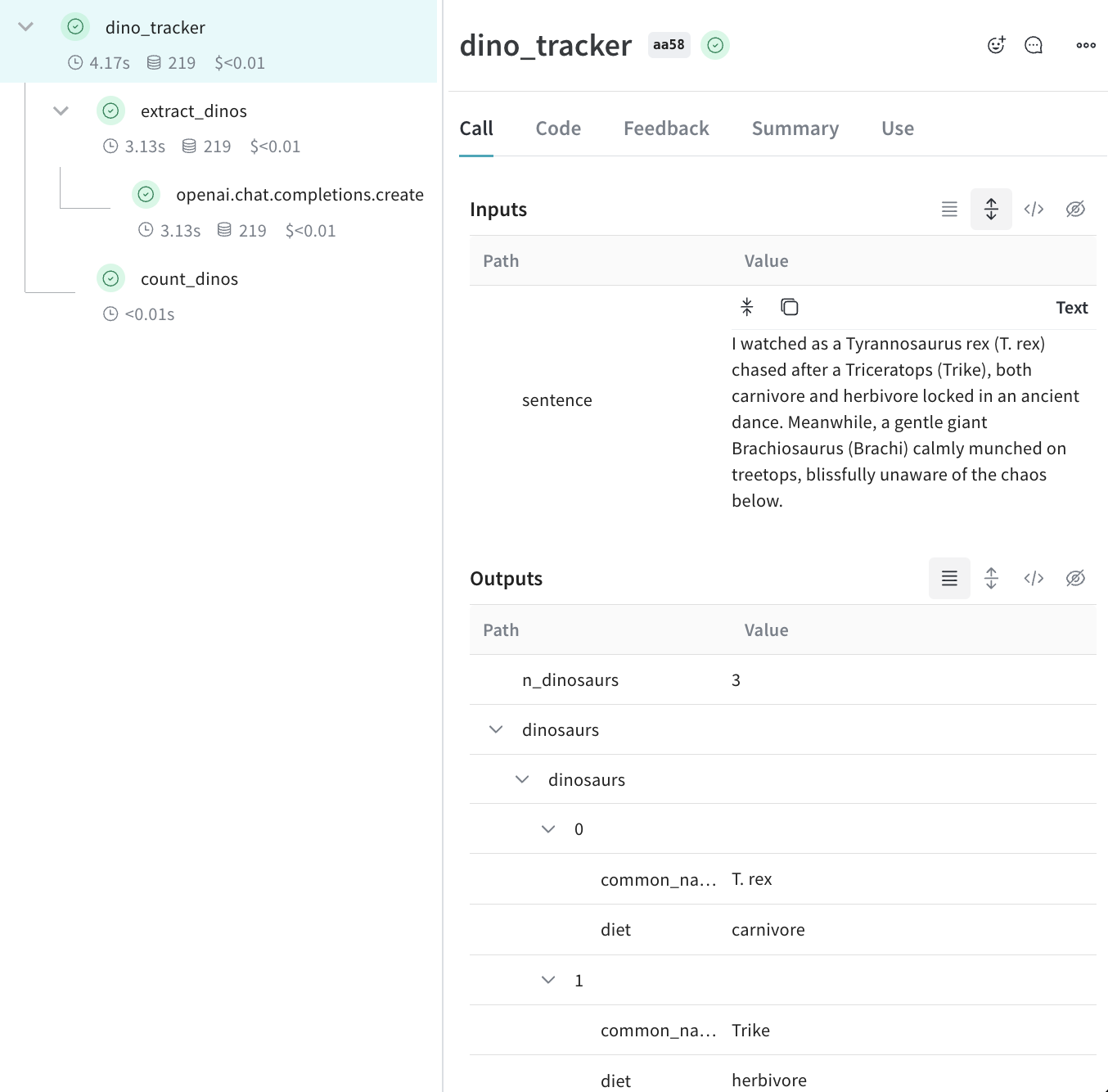
**ネストされた関数**
上記の コード を実行すると、2つのネストされた関数( `extract_dinos` と `count_dinos` )からの入力と出力、および自動的に ログ 記録された OpenAI のトレースが表示されます。
 ```typescript theme={null}
import OpenAI from 'openai';
import * as weave from 'weave';
const openai = new OpenAI();
const extractDinos = weave.op(async (sentence: string) => {
const response = await openai.chat.completions.create({
model: 'gpt-4o',
messages: [
{
role: 'system',
content:
'Extract any dinosaur `name`, their `common_name`, names and whether its `diet` is a herbivore or carnivore, in JSON format.',
},
{role: 'user', content: sentence},
],
response_format: {type: 'json_object'},
});
return response.choices[0].message.content;
});
const countDinos = weave.op(async (dinoData: string) => {
const parsed = JSON.parse(dinoData);
return Object.keys(parsed).length;
});
const dinoTracker = weave.op(async (sentence: string) => {
const dinoData = await extractDinos(sentence);
const nDinos = await countDinos(dinoData);
return {nDinos, dinoData};
});
async function main() {
await weave.init('jurassic-park');
const sentence = `I watched as a Tyrannosaurus rex (T. rex) chased after a Triceratops (Trike),
both carnivore and herbivore locked in an ancient dance. Meanwhile, a gentle giant
Brachiosaurus (Brachi) calmly munched on treetops, blissfully unaware of the chaos below.`;
const result = await dinoTracker(sentence);
console.log(result);
}
main();
```
**ネストされた関数**
上記の コード を実行すると、2つのネストされた関数( `extractDinos` と `countDinos` )からの入力と出力、および自動的に ログ 記録された OpenAI のトレースが表示されます。
## メタデータの追跡
`weave.attributes` コンテキストマネージャーを使用し、呼び出し時に追跡する メタデータ の 辞書 を渡すことで、 メタデータ を追跡できます。
上記の例の続きです:
```python lines {1,10-11} theme={null}
import weave
weave.init('jurassic-park')
sentence = """I watched as a Tyrannosaurus rex (T. rex) chased after a Triceratops (Trike), \
both carnivore and herbivore locked in an ancient dance. Meanwhile, a gentle giant \
Brachiosaurus (Brachi) calmly munched on treetops, blissfully unaware of the chaos below."""
# 以前に定義した関数とともにメタデータを追跡する
with weave.attributes({'user_id': 'lukas', 'env': 'production'}):
result = dino_tracker(sentence)
```
```plaintext theme={null}
この機能は TypeScript ではまだ利用できません。今後のアップデートにご期待ください!
```
ユーザー ID や コード の 環境 ステータス(開発、ステージング、 プロダクション など)、実行時の メタデータ を追跡することをお勧めします。
システムプロンプトなどの システム 設定 を追跡するには、 [Weave Models](/weave/guides/core-types/models) の使用をお勧めします。
## 次のステップ
* [App Versioning チュートリアル](/weave/tutorial-weave_models) に従って、アドホックなプロンプト、 モデル 、 アプリケーション の変更をキャプチャ、 バージョン管理 、整理する方法を確認してください。
```typescript theme={null}
import OpenAI from 'openai';
import * as weave from 'weave';
const openai = new OpenAI();
const extractDinos = weave.op(async (sentence: string) => {
const response = await openai.chat.completions.create({
model: 'gpt-4o',
messages: [
{
role: 'system',
content:
'Extract any dinosaur `name`, their `common_name`, names and whether its `diet` is a herbivore or carnivore, in JSON format.',
},
{role: 'user', content: sentence},
],
response_format: {type: 'json_object'},
});
return response.choices[0].message.content;
});
const countDinos = weave.op(async (dinoData: string) => {
const parsed = JSON.parse(dinoData);
return Object.keys(parsed).length;
});
const dinoTracker = weave.op(async (sentence: string) => {
const dinoData = await extractDinos(sentence);
const nDinos = await countDinos(dinoData);
return {nDinos, dinoData};
});
async function main() {
await weave.init('jurassic-park');
const sentence = `I watched as a Tyrannosaurus rex (T. rex) chased after a Triceratops (Trike),
both carnivore and herbivore locked in an ancient dance. Meanwhile, a gentle giant
Brachiosaurus (Brachi) calmly munched on treetops, blissfully unaware of the chaos below.`;
const result = await dinoTracker(sentence);
console.log(result);
}
main();
```
**ネストされた関数**
上記の コード を実行すると、2つのネストされた関数( `extractDinos` と `countDinos` )からの入力と出力、および自動的に ログ 記録された OpenAI のトレースが表示されます。
## メタデータの追跡
`weave.attributes` コンテキストマネージャーを使用し、呼び出し時に追跡する メタデータ の 辞書 を渡すことで、 メタデータ を追跡できます。
上記の例の続きです:
```python lines {1,10-11} theme={null}
import weave
weave.init('jurassic-park')
sentence = """I watched as a Tyrannosaurus rex (T. rex) chased after a Triceratops (Trike), \
both carnivore and herbivore locked in an ancient dance. Meanwhile, a gentle giant \
Brachiosaurus (Brachi) calmly munched on treetops, blissfully unaware of the chaos below."""
# 以前に定義した関数とともにメタデータを追跡する
with weave.attributes({'user_id': 'lukas', 'env': 'production'}):
result = dino_tracker(sentence)
```
```plaintext theme={null}
この機能は TypeScript ではまだ利用できません。今後のアップデートにご期待ください!
```
ユーザー ID や コード の 環境 ステータス(開発、ステージング、 プロダクション など)、実行時の メタデータ を追跡することをお勧めします。
システムプロンプトなどの システム 設定 を追跡するには、 [Weave Models](/weave/guides/core-types/models) の使用をお勧めします。
## 次のステップ
* [App Versioning チュートリアル](/weave/tutorial-weave_models) に従って、アドホックなプロンプト、 モデル 、 アプリケーション の変更をキャプチャ、 バージョン管理 、整理する方法を確認してください。