> ## Documentation Index
> Fetch the complete documentation index at: https://wb-21fd5541-serverless-sft-revamp.mintlify.site/llms.txt
> Use this file to discover all available pages before exploring further.
# thoughtful philosophy vitamins.
Hugging Face Diffusers운영체제: Windows 10
그래픽카드: NVIDIA GeForce RTX 30
export const ColabLink = ({url}) =>
Try in Colab
;
[Hugging Face Diffusers](https://huggingface.co/docs/diffusers) 는 이미지, 오디오, 그리고 분자의 3D 구조까지 생성할 수 있는 최첨단 사전학습된 diffusion 모델을 위한 핵심 라이브러리입니다. W\&B 인테그레이션은 사용 편의성을 유지하면서도, 인터랙티브한 중앙 집중식 대시보드에 풍부하고 유연한 실험 추적, 미디어 시각화, 파이프라인 아키텍처 및 설정 관리를 추가합니다.
## 단 두 줄의 코드로 구현하는 차원이 다른 로그
단 2줄의 코드를 추가하는 것만으로 실험과 관련된 모든 프롬프트, 네거티브 프롬프트, 생성된 미디어 및 설정을 로그할 수 있습니다. 로깅을 시작하기 위한 2줄의 코드는 다음과 같습니다:
```python theme={null}
# autolog 함수 임포트
from wandb.integration.diffusers import autolog
# 파이프라인 호출 전에 autolog 호출
autolog(init=dict(project="diffusers_logging"))
```
## 시작하기
1. `diffusers`, `transformers`, `accelerate`, 그리고 `wandb`를 설치합니다.
* 커맨드라인:
```shell theme={null}
pip install --upgrade diffusers transformers accelerate wandb
```
* 노트북:
```bash theme={null}
!pip install --upgrade diffusers transformers accelerate wandb
```
2. `autolog`를 사용하여 W\&B Run 을 초기화하고, [지원되는 모든 파이프라인 호출](https://github.com/wandb/wandb/blob/main/wandb/integration/diffusers/autologger.py#L12-L72)로부터 입력과 출력을 자동으로 추적합니다.
`autolog()` 함수를 호출할 때 [`wandb.init()`](/models/ref/python/functions/init) 에 필요한 파라미터 사전을 받는 `init` 파라미터를 함께 사용할 수 있습니다.
`autolog()`를 호출하면 W\&B Run 이 초기화되고, [지원되는 모든 파이프라인 호출](https://github.com/wandb/wandb/blob/main/wandb/integration/diffusers/autologger.py#L12-L72)로부터 입력과 출력을 자동으로 추적합니다.
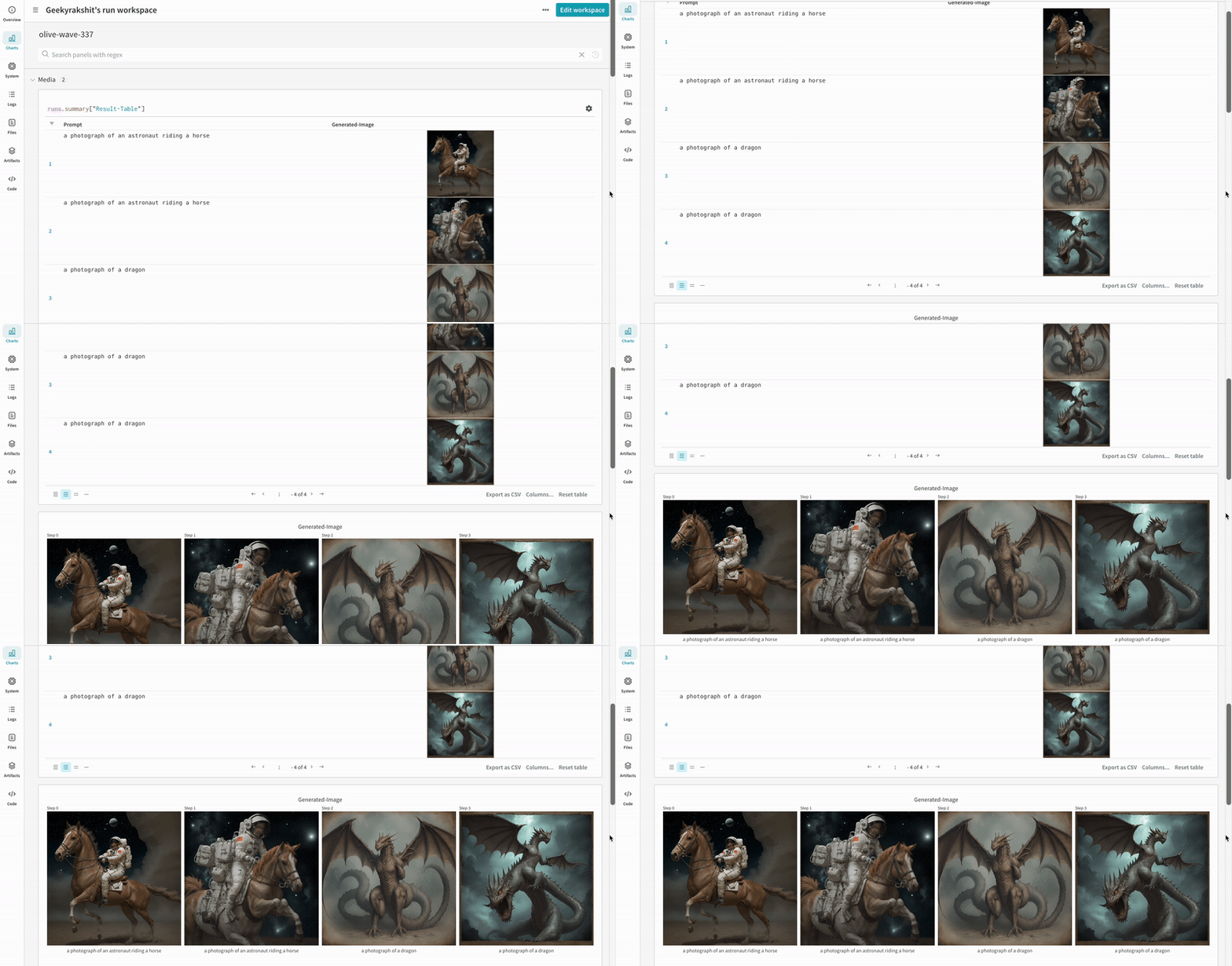
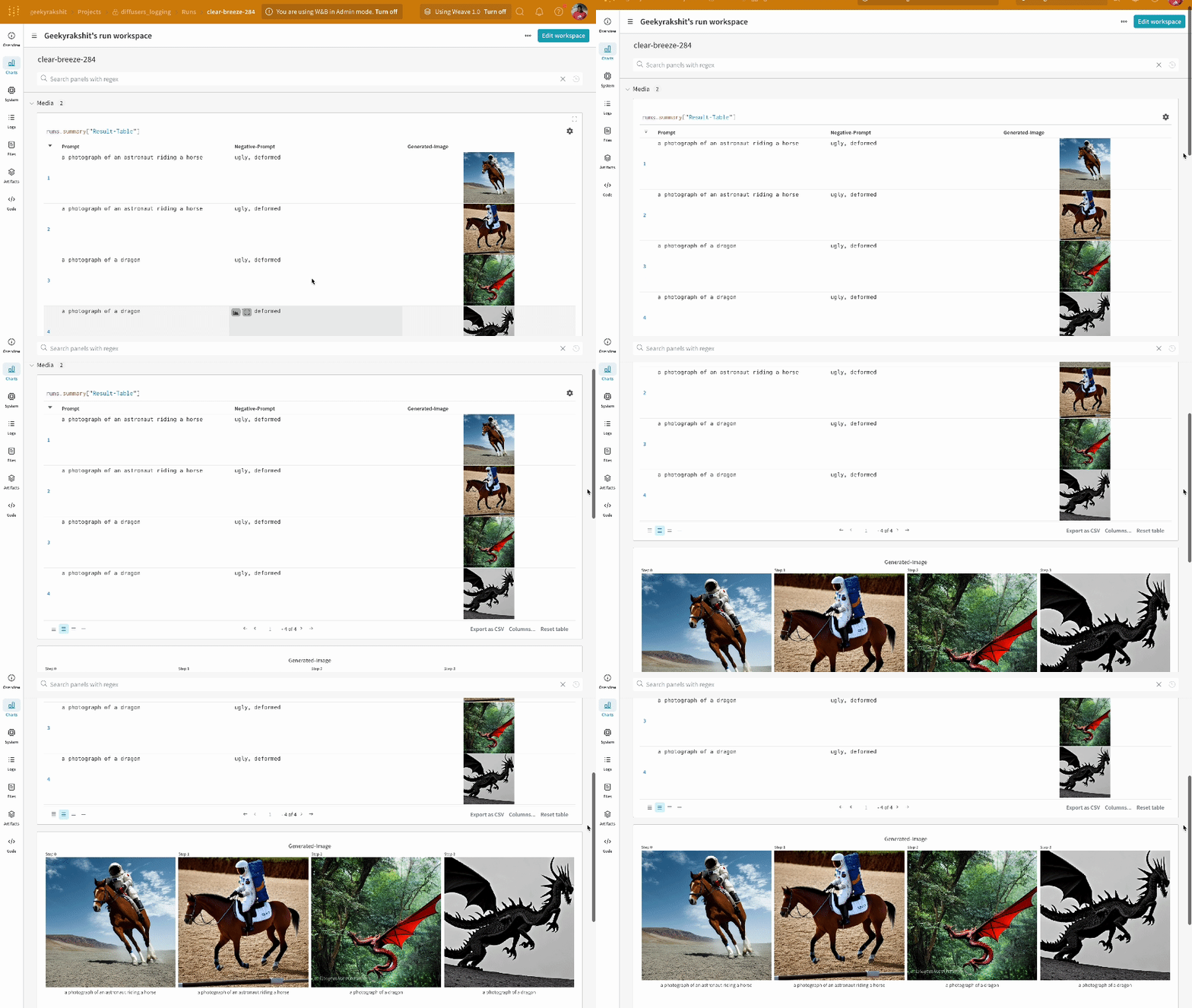
* 각 파이프라인 호출은 Workspace 내의 개별 [Table](/models/tables/)로 추적되며, 파이프라인 호출과 관련된 설정은 해당 run 의 설정 내 워크플로우 리스트에 추가됩니다.
* 프롬프트, 네거티브 프롬프트, 그리고 생성된 미디어는 [`wandb.Table`](/models/tables/)에 로그됩니다.
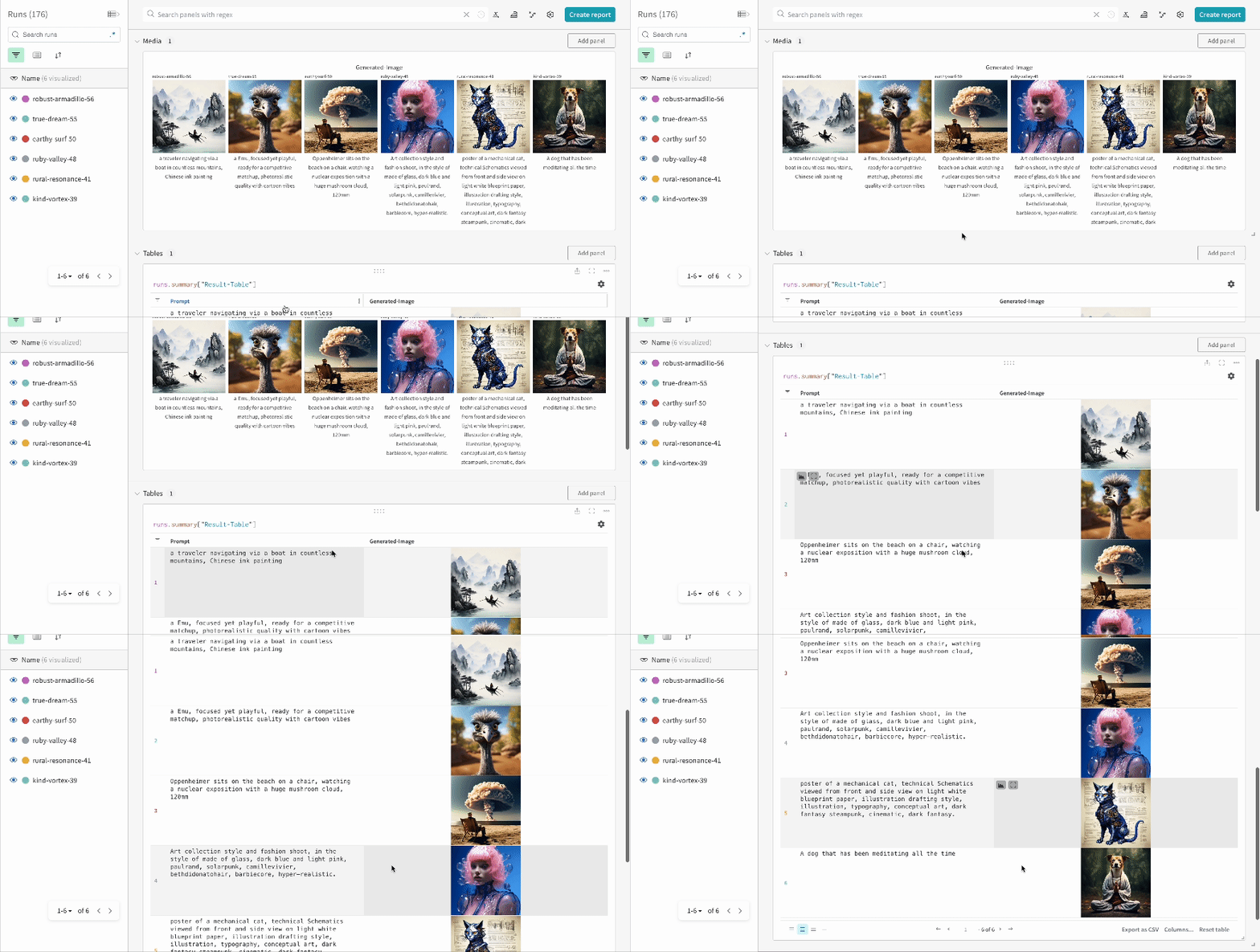
* 시드(seed) 및 파이프라인 아키텍처를 포함하여 실험과 관련된 모든 기타 설정은 run 의 설정 섹션에 저장됩니다.
* 각 파이프라인 호출에 대해 생성된 미디어는 run 의 [미디어 패널](/models/track/log/media/)에도 로그됩니다.
[지원되는 파이프라인 호출 목록](https://github.com/wandb/wandb/blob/main/wandb/integration/diffusers/autologger.py#L12-L72)을 확인할 수 있습니다. 이 인테그레이션에 대한 새로운 기능을 요청하거나 버그를 리포트하려면 [W\&B GitHub 이슈 페이지](https://github.com/wandb/wandb/issues)에 이슈를 생성해 주세요.
## 예제
### Autologging
다음은 autolog 가 작동하는 간단한 엔드투엔드 예제입니다:
```python theme={null}
import torch
from diffusers import DiffusionPipeline
# autolog 함수 임포트
from wandb.integration.diffusers import autolog
# 파이프라인 호출 전에 autolog 호출
autolog(init=dict(project="diffusers_logging"))
# Diffusion 파이프라인 초기화
pipeline = DiffusionPipeline.from_pretrained(
"stabilityai/stable-diffusion-2-1", torch_dtype=torch.float16
).to("cuda")
# 프롬프트, 네거티브 프롬프트 및 시드 정의
prompt = ["a photograph of an astronaut riding a horse", "a photograph of a dragon"]
negative_prompt = ["ugly, deformed", "ugly, deformed"]
generator = torch.Generator(device="cpu").manual_seed(10)
# 이미지를 생성하기 위해 파이프라인 호출
images = pipeline(
prompt,
negative_prompt=negative_prompt,
num_images_per_prompt=2,
generator=generator,
)
```
```python theme={null}
import torch
from diffusers import DiffusionPipeline
import wandb
# autolog 함수 임포트
from wandb.integration.diffusers import autolog
run = wandb.init()
# 파이프라인 호출 전에 autolog 호출
autolog(init=dict(project="diffusers_logging"))
# Diffusion 파이프라인 초기화
pipeline = DiffusionPipeline.from_pretrained(
"stabilityai/stable-diffusion-2-1", torch_dtype=torch.float16
).to("cuda")
# 프롬프트, 네거티브 프롬프트 및 시드 정의
prompt = ["a photograph of an astronaut riding a horse", "a photograph of a dragon"]
negative_prompt = ["ugly, deformed", "ugly, deformed"]
generator = torch.Generator(device="cpu").manual_seed(10)
# 이미지를 생성하기 위해 파이프라인 호출
images = pipeline(
prompt,
negative_prompt=negative_prompt,
num_images_per_prompt=2,
generator=generator,
)
# 실험 종료
run.finish()
```
* 단일 실험 결과:
* 여러 실험 결과:
* 실험 설정(config):
IPython 노트북 환경에서 파이프라인 호출 후 코드를 실행할 때는 명시적으로 [`wandb.Run.finish()`](/models/ref/python/functions/finish) 를 호출해야 합니다. 파이썬 스크립트를 실행할 때는 필요하지 않습니다.
### 멀티 파이프라인 워크플로우 추적
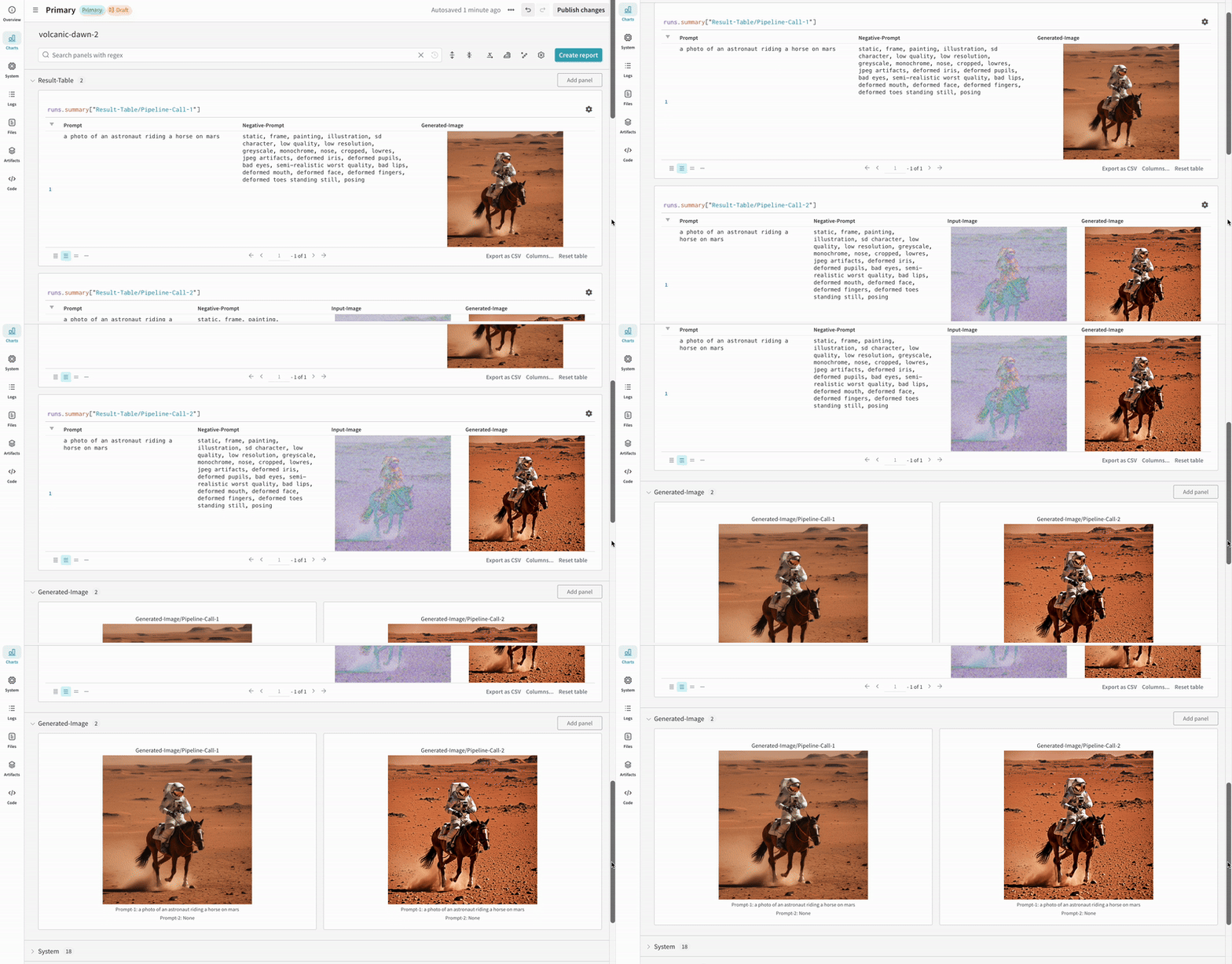
이 섹션에서는 일반적인 [Stable Diffusion XL + Refiner](https://huggingface.co/docs/diffusers/using-diffusers/sdxl#base-to-refiner-model) 워크플로우와 함께 autolog 를 사용하는 방법을 보여줍니다. 이 워크플로우에서는 [`StableDiffusionXLPipeline`](https://huggingface.co/docs/diffusers/api/pipelines/stable_diffusion/stable_diffusion_xl) 에 의해 생성된 latents 가 해당 refiner 에 의해 정제됩니다.
```python theme={null}
import torch
from diffusers import StableDiffusionXLImg2ImgPipeline, StableDiffusionXLPipeline
from wandb.integration.diffusers import autolog
# SDXL base 파이프라인 초기화
base_pipeline = StableDiffusionXLPipeline.from_pretrained(
"stabilityai/stable-diffusion-xl-base-1.0",
torch_dtype=torch.float16,
variant="fp16",
use_safetensors=True,
)
base_pipeline.enable_model_cpu_offload()
# SDXL refiner 파이프라인 초기화
refiner_pipeline = StableDiffusionXLImg2ImgPipeline.from_pretrained(
"stabilityai/stable-diffusion-xl-refiner-1.0",
text_encoder_2=base_pipeline.text_encoder_2,
vae=base_pipeline.vae,
torch_dtype=torch.float16,
use_safetensors=True,
variant="fp16",
)
refiner_pipeline.enable_model_cpu_offload()
prompt = "a photo of an astronaut riding a horse on mars"
negative_prompt = "static, frame, painting, illustration, sd character, low quality, low resolution, greyscale, monochrome, nose, cropped, lowres, jpeg artifacts, deformed iris, deformed pupils, bad eyes, semi-realistic worst quality, bad lips, deformed mouth, deformed face, deformed fingers, deformed toes standing still, posing"
# 무작위성을 제어하여 실험을 재현 가능하게 만듭니다.
# 시드는 자동으로 W&B에 로그됩니다.
seed = 42
generator_base = torch.Generator(device="cuda").manual_seed(seed)
generator_refiner = torch.Generator(device="cuda").manual_seed(seed)
# Diffusers를 위한 W&B Autolog 호출. 프롬프트, 생성된 이미지,
# 파이프라인 아키텍처 및 모든 관련 실험 설정을 W&B에 자동으로 로그하여
# 이미지 생성 실험을 쉽게 재현, 공유 및 분석할 수 있게 합니다.
autolog(init=dict(project="sdxl"))
# Latents를 생성하기 위해 base 파이프라인 호출
image = base_pipeline(
prompt=prompt,
negative_prompt=negative_prompt,
output_type="latent",
generator=generator_base,
).images[0]
# 정제된 이미지를 생성하기 위해 refiner 파이프라인 호출
image = refiner_pipeline(
prompt=prompt,
negative_prompt=negative_prompt,
image=image[None, :],
generator=generator_refiner,
).images[0]
```
```python theme={null}
import torch
from diffusers import StableDiffusionXLImg2ImgPipeline, StableDiffusionXLPipeline
import wandb
from wandb.integration.diffusers import autolog
run = wandb.init()
# SDXL base 파이프라인 초기화
base_pipeline = StableDiffusionXLPipeline.from_pretrained(
"stabilityai/stable-diffusion-xl-base-1.0",
torch_dtype=torch.float16,
variant="fp16",
use_safetensors=True,
)
base_pipeline.enable_model_cpu_offload()
# SDXL refiner 파이프라인 초기화
refiner_pipeline = StableDiffusionXLImg2ImgPipeline.from_pretrained(
"stabilityai/stable-diffusion-xl-refiner-1.0",
text_encoder_2=base_pipeline.text_encoder_2,
vae=base_pipeline.vae,
torch_dtype=torch.float16,
use_safetensors=True,
variant="fp16",
)
refiner_pipeline.enable_model_cpu_offload()
prompt = "a photo of an astronaut riding a horse on mars"
negative_prompt = "static, frame, painting, illustration, sd character, low quality, low resolution, greyscale, monochrome, nose, cropped, lowres, jpeg artifacts, deformed iris, deformed pupils, bad eyes, semi-realistic worst quality, bad lips, deformed mouth, deformed face, deformed fingers, deformed toes standing still, posing"
# 무작위성을 제어하여 실험을 재현 가능하게 만듭니다.
# 시드는 자동으로 W&B에 로그됩니다.
seed = 42
generator_base = torch.Generator(device="cuda").manual_seed(seed)
generator_refiner = torch.Generator(device="cuda").manual_seed(seed)
# Diffusers를 위한 W&B Autolog 호출. 프롬프트, 생성된 이미지,
# 파이프라인 아키텍처 및 모든 관련 실험 설정을 W&B에 자동으로 로그하여
# 이미지 생성 실험을 쉽게 재현, 공유 및 분석할 수 있게 합니다.
autolog(init=dict(project="sdxl"))
# Latents를 생성하기 위해 base 파이프라인 호출
image = base_pipeline(
prompt=prompt,
negative_prompt=negative_prompt,
output_type="latent",
generator=generator_base,
).images[0]
# 정제된 이미지를 생성하기 위해 refiner 파이프라인 호출
image = refiner_pipeline(
prompt=prompt,
negative_prompt=negative_prompt,
image=image[None, :],
generator=generator_refiner,
).images[0]
# 실험 종료
run.finish()
```
* Stable Diffusion XL + Refiner 실험 예시:
## 추가 자료
* [A Guide to Prompt Engineering for Stable Diffusion](https://wandb.ai/geekyrakshit/diffusers-prompt-engineering/reports/A-Guide-to-Prompt-Engineering-for-Stable-Diffusion--Vmlldzo1NzY4NzQ3)
* [PIXART-α: A Diffusion Transformer Model for Text-to-Image Generation](https://wandb.ai/geekyrakshit/pixart-alpha/reports/PIXART-A-Diffusion-Transformer-Model-for-Text-to-Image-Generation--Vmlldzo2MTE1NzM3)
 ## 시작하기
1. `diffusers`, `transformers`, `accelerate`, 그리고 `wandb`를 설치합니다.
* 커맨드라인:
```shell theme={null}
pip install --upgrade diffusers transformers accelerate wandb
```
* 노트북:
```bash theme={null}
!pip install --upgrade diffusers transformers accelerate wandb
```
2. `autolog`를 사용하여 W\&B Run 을 초기화하고, [지원되는 모든 파이프라인 호출](https://github.com/wandb/wandb/blob/main/wandb/integration/diffusers/autologger.py#L12-L72)로부터 입력과 출력을 자동으로 추적합니다.
`autolog()` 함수를 호출할 때 [`wandb.init()`](/models/ref/python/functions/init) 에 필요한 파라미터 사전을 받는 `init` 파라미터를 함께 사용할 수 있습니다.
`autolog()`를 호출하면 W\&B Run 이 초기화되고, [지원되는 모든 파이프라인 호출](https://github.com/wandb/wandb/blob/main/wandb/integration/diffusers/autologger.py#L12-L72)로부터 입력과 출력을 자동으로 추적합니다.
* 각 파이프라인 호출은 Workspace 내의 개별 [Table](/models/tables/)로 추적되며, 파이프라인 호출과 관련된 설정은 해당 run 의 설정 내 워크플로우 리스트에 추가됩니다.
* 프롬프트, 네거티브 프롬프트, 그리고 생성된 미디어는 [`wandb.Table`](/models/tables/)에 로그됩니다.
* 시드(seed) 및 파이프라인 아키텍처를 포함하여 실험과 관련된 모든 기타 설정은 run 의 설정 섹션에 저장됩니다.
* 각 파이프라인 호출에 대해 생성된 미디어는 run 의 [미디어 패널](/models/track/log/media/)에도 로그됩니다.
## 시작하기
1. `diffusers`, `transformers`, `accelerate`, 그리고 `wandb`를 설치합니다.
* 커맨드라인:
```shell theme={null}
pip install --upgrade diffusers transformers accelerate wandb
```
* 노트북:
```bash theme={null}
!pip install --upgrade diffusers transformers accelerate wandb
```
2. `autolog`를 사용하여 W\&B Run 을 초기화하고, [지원되는 모든 파이프라인 호출](https://github.com/wandb/wandb/blob/main/wandb/integration/diffusers/autologger.py#L12-L72)로부터 입력과 출력을 자동으로 추적합니다.
`autolog()` 함수를 호출할 때 [`wandb.init()`](/models/ref/python/functions/init) 에 필요한 파라미터 사전을 받는 `init` 파라미터를 함께 사용할 수 있습니다.
`autolog()`를 호출하면 W\&B Run 이 초기화되고, [지원되는 모든 파이프라인 호출](https://github.com/wandb/wandb/blob/main/wandb/integration/diffusers/autologger.py#L12-L72)로부터 입력과 출력을 자동으로 추적합니다.
* 각 파이프라인 호출은 Workspace 내의 개별 [Table](/models/tables/)로 추적되며, 파이프라인 호출과 관련된 설정은 해당 run 의 설정 내 워크플로우 리스트에 추가됩니다.
* 프롬프트, 네거티브 프롬프트, 그리고 생성된 미디어는 [`wandb.Table`](/models/tables/)에 로그됩니다.
* 시드(seed) 및 파이프라인 아키텍처를 포함하여 실험과 관련된 모든 기타 설정은 run 의 설정 섹션에 저장됩니다.
* 각 파이프라인 호출에 대해 생성된 미디어는 run 의 [미디어 패널](/models/track/log/media/)에도 로그됩니다.
 * 여러 실험 결과:
 * 실험 설정(config):
 ## 추가 자료
* [A Guide to Prompt Engineering for Stable Diffusion](https://wandb.ai/geekyrakshit/diffusers-prompt-engineering/reports/A-Guide-to-Prompt-Engineering-for-Stable-Diffusion--Vmlldzo1NzY4NzQ3)
* [PIXART-α: A Diffusion Transformer Model for Text-to-Image Generation](https://wandb.ai/geekyrakshit/pixart-alpha/reports/PIXART-A-Diffusion-Transformer-Model-for-Text-to-Image-Generation--Vmlldzo2MTE1NzM3)
## 추가 자료
* [A Guide to Prompt Engineering for Stable Diffusion](https://wandb.ai/geekyrakshit/diffusers-prompt-engineering/reports/A-Guide-to-Prompt-Engineering-for-Stable-Diffusion--Vmlldzo1NzY4NzQ3)
* [PIXART-α: A Diffusion Transformer Model for Text-to-Image Generation](https://wandb.ai/geekyrakshit/pixart-alpha/reports/PIXART-A-Diffusion-Transformer-Model-for-Text-to-Image-Generation--Vmlldzo2MTE1NzM3)