> ## Documentation Index
> Fetch the complete documentation index at: https://wb-21fd5541-serverless-sft-revamp.mintlify.site/llms.txt
> Use this file to discover all available pages before exploring further.
# 애플리케이션 로직 추적
> LLM 애플리케이션에서 데이터 흐름과 메타데이터를 추적하는 방법을 알아보세요
[Track LLM inputs & outputs](/weave/quickstart) 튜토리얼에서는 LLM의 입력과 출력을 추적하는 기본 방법을 다루었습니다.
이 튜토리얼에서는 다음 내용을 배우게 됩니다:
* 애플리케이션을 통해 흐르는 **데이터 추적**
* 호출 시점의 **메타데이터 추적**
## 중첩된 함수 호출 추적
LLM 기반 애플리케이션은 여러 번의 LLM 호출과 추가적인 데이터 처리 및 검증 로직을 포함할 수 있으며, 이를 모니터링하는 것은 매우 중요합니다. 많은 앱에서 흔히 볼 수 있는 깊게 중첩된 호출 구조에서도, 추적하려는 모든 함수에 `weave.op()`를 추가하기만 하면 Weave 가 중첩된 함수들 사이의 부모-자식 관계를 추적합니다.
[퀵스타트 예제](/weave/quickstart)를 확장하여, 다음 코드는 LLM에서 반환된 아이템의 개수를 세고 이를 상위 레벨 함수로 감싸는 추가 로직을 더합니다. 또한, `weave.op()`를 사용하여 모든 함수, 호출 순서 및 부모-자식 관계를 추적합니다:
```python {1,7,26,32,42} theme={null}
import weave
import json
from openai import OpenAI
client = OpenAI()
@weave.op()
def extract_dinos(sentence: str) -> dict:
response = client.chat.completions.create(
model="gpt-4o",
messages=[
{
"role": "system",
"content": """Extract any dinosaur `name`, their `common_name`, \
names and whether its `diet` is a herbivore or carnivore, in JSON format."""
},
{
"role": "user",
"content": sentence
}
],
response_format={ "type": "json_object" }
)
return response.choices[0].message.content
@weave.op()
def count_dinos(dino_data: dict) -> int:
# 반환된 리스트의 아이템 개수를 셉니다
k = list(dino_data.keys())[0]
return len(dino_data[k])
@weave.op()
def dino_tracker(sentence: str) -> dict:
# LLM을 사용하여 공룡 데이터를 추출합니다
dino_data = extract_dinos(sentence)
# 반환된 공룡의 개수를 셉니다
dino_data = json.loads(dino_data)
n_dinos = count_dinos(dino_data)
return {"n_dinosaurs": n_dinos, "dinosaurs": dino_data}
weave.init('jurassic-park')
sentence = """I watched as a Tyrannosaurus rex (T. rex) chased after a Triceratops (Trike), \
both carnivore and herbivore locked in an ancient dance. Meanwhile, a gentle giant \
Brachiosaurus (Brachi) calmly munched on treetops, blissfully unaware of the chaos below."""
result = dino_tracker(sentence)
print(result)
```
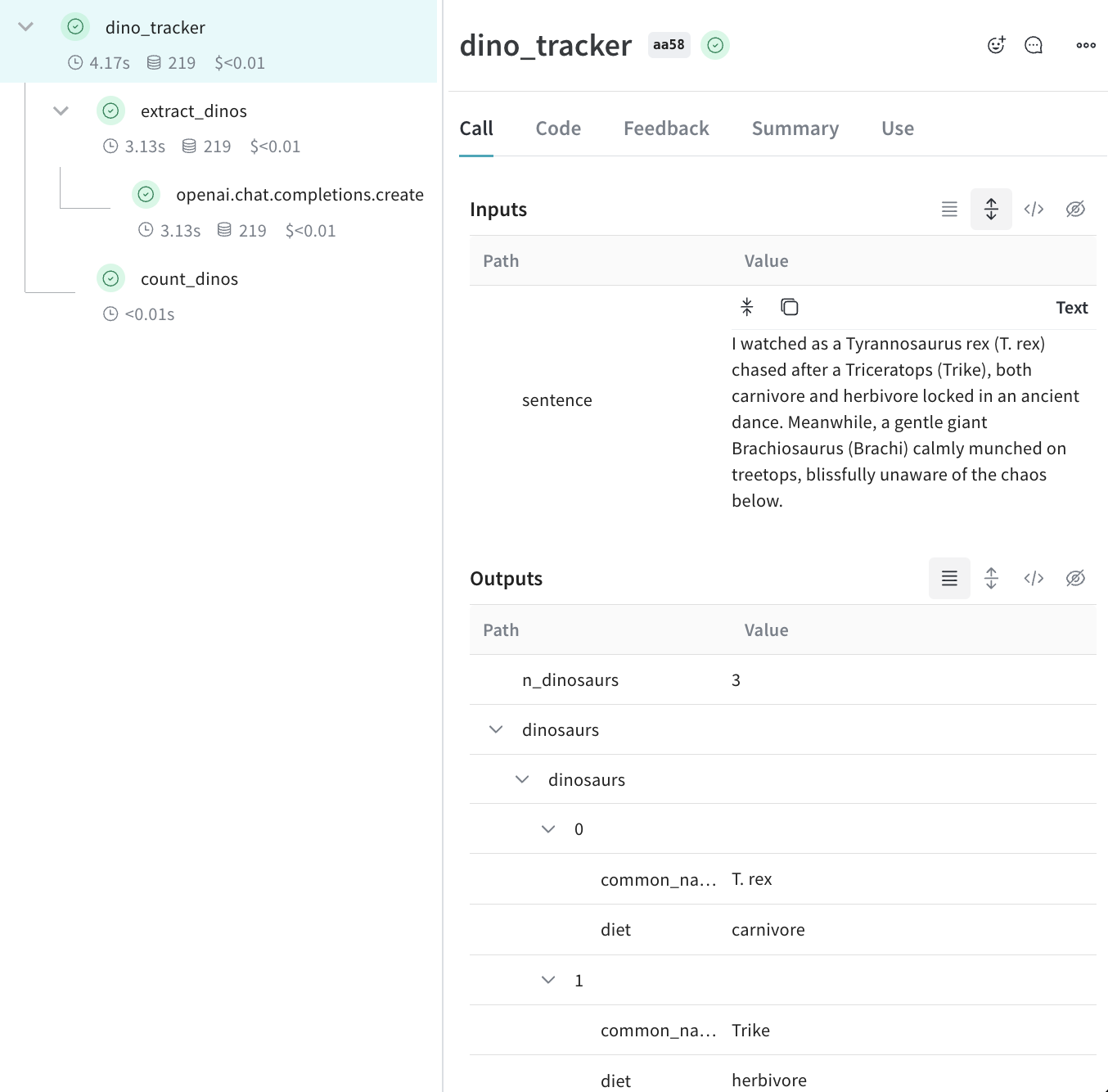
**중첩된 함수**
위 코드를 실행하면 두 개의 중첩된 함수(`extract_dinos`와 `count_dinos`)의 입력과 결과는 물론, 자동으로 로그된 OpenAI trace를 확인할 수 있습니다.
 ```typescript theme={null}
import OpenAI from 'openai';
import * as weave from 'weave';
const openai = new OpenAI();
const extractDinos = weave.op(async (sentence: string) => {
const response = await openai.chat.completions.create({
model: 'gpt-4o',
messages: [
{
role: 'system',
content:
'Extract any dinosaur `name`, their `common_name`, names and whether its `diet` is a herbivore or carnivore, in JSON format.',
},
{role: 'user', content: sentence},
],
response_format: {type: 'json_object'},
});
return response.choices[0].message.content;
});
const countDinos = weave.op(async (dinoData: string) => {
const parsed = JSON.parse(dinoData);
return Object.keys(parsed).length;
});
const dinoTracker = weave.op(async (sentence: string) => {
const dinoData = await extractDinos(sentence);
const nDinos = await countDinos(dinoData);
return {nDinos, dinoData};
});
async function main() {
await weave.init('jurassic-park');
const sentence = `I watched as a Tyrannosaurus rex (T. rex) chased after a Triceratops (Trike),
both carnivore and herbivore locked in an ancient dance. Meanwhile, a gentle giant
Brachiosaurus (Brachi) calmly munched on treetops, blissfully unaware of the chaos below.`;
const result = await dinoTracker(sentence);
console.log(result);
}
main();
```
**중첩된 함수**
위 코드를 실행하면 두 개의 중첩된 함수(`extractDinos`와 `countDinos`)의 입력과 결과는 물론, 자동으로 로그된 OpenAI trace를 확인할 수 있습니다.
## 메타데이터 추적
`weave.attributes` 컨텍스트 매니저를 사용하여 호출 시점에 추적할 메타데이터 사전을 전달함으로써 메타데이터를 추적할 수 있습니다.
위의 예제를 이어가겠습니다:
```python lines {1,10-11} theme={null}
import weave
weave.init('jurassic-park')
sentence = """I watched as a Tyrannosaurus rex (T. rex) chased after a Triceratops (Trike), \
both carnivore and herbivore locked in an ancient dance. Meanwhile, a gentle giant \
Brachiosaurus (Brachi) calmly munched on treetops, blissfully unaware of the chaos below."""
# 이전에 정의된 함수와 함께 메타데이터를 추적합니다
with weave.attributes({'user_id': 'lukas', 'env': 'production'}):
result = dino_tracker(sentence)
```
```plaintext theme={null}
이 기능은 아직 TypeScript에서 사용할 수 없습니다. 곧 업데이트될 예정입니다!
```
사용자 ID나 코드의 환경 상태(development, staging 또는 production)와 같은 메타데이터는 run 타임에 추적하는 것을 권장합니다.
시스템 프롬프트와 같은 시스템 설정을 추적하려면 [Weave Models](/weave/guides/core-types/models) 사용을 권장합니다.
## 다음 단계는?
* [App Versioning 튜토리얼](/weave/tutorial-weave_models)을 따라 임시 프롬프트, 모델 및 애플리케이션 변경 사항을 캡처하고 버전 관리하며 정리하는 방법을 알아보세요.
```typescript theme={null}
import OpenAI from 'openai';
import * as weave from 'weave';
const openai = new OpenAI();
const extractDinos = weave.op(async (sentence: string) => {
const response = await openai.chat.completions.create({
model: 'gpt-4o',
messages: [
{
role: 'system',
content:
'Extract any dinosaur `name`, their `common_name`, names and whether its `diet` is a herbivore or carnivore, in JSON format.',
},
{role: 'user', content: sentence},
],
response_format: {type: 'json_object'},
});
return response.choices[0].message.content;
});
const countDinos = weave.op(async (dinoData: string) => {
const parsed = JSON.parse(dinoData);
return Object.keys(parsed).length;
});
const dinoTracker = weave.op(async (sentence: string) => {
const dinoData = await extractDinos(sentence);
const nDinos = await countDinos(dinoData);
return {nDinos, dinoData};
});
async function main() {
await weave.init('jurassic-park');
const sentence = `I watched as a Tyrannosaurus rex (T. rex) chased after a Triceratops (Trike),
both carnivore and herbivore locked in an ancient dance. Meanwhile, a gentle giant
Brachiosaurus (Brachi) calmly munched on treetops, blissfully unaware of the chaos below.`;
const result = await dinoTracker(sentence);
console.log(result);
}
main();
```
**중첩된 함수**
위 코드를 실행하면 두 개의 중첩된 함수(`extractDinos`와 `countDinos`)의 입력과 결과는 물론, 자동으로 로그된 OpenAI trace를 확인할 수 있습니다.
## 메타데이터 추적
`weave.attributes` 컨텍스트 매니저를 사용하여 호출 시점에 추적할 메타데이터 사전을 전달함으로써 메타데이터를 추적할 수 있습니다.
위의 예제를 이어가겠습니다:
```python lines {1,10-11} theme={null}
import weave
weave.init('jurassic-park')
sentence = """I watched as a Tyrannosaurus rex (T. rex) chased after a Triceratops (Trike), \
both carnivore and herbivore locked in an ancient dance. Meanwhile, a gentle giant \
Brachiosaurus (Brachi) calmly munched on treetops, blissfully unaware of the chaos below."""
# 이전에 정의된 함수와 함께 메타데이터를 추적합니다
with weave.attributes({'user_id': 'lukas', 'env': 'production'}):
result = dino_tracker(sentence)
```
```plaintext theme={null}
이 기능은 아직 TypeScript에서 사용할 수 없습니다. 곧 업데이트될 예정입니다!
```
사용자 ID나 코드의 환경 상태(development, staging 또는 production)와 같은 메타데이터는 run 타임에 추적하는 것을 권장합니다.
시스템 프롬프트와 같은 시스템 설정을 추적하려면 [Weave Models](/weave/guides/core-types/models) 사용을 권장합니다.
## 다음 단계는?
* [App Versioning 튜토리얼](/weave/tutorial-weave_models)을 따라 임시 프롬프트, 모델 및 애플리케이션 변경 사항을 캡처하고 버전 관리하며 정리하는 방법을 알아보세요.